TradingView spread betting brokers connect chart analysis with a brokerage account that supports financial spread bets. The attraction is straightforward: analyse a market, prepare an order and manage the position without repeatedly switching platforms.
The catch is account compatibility. A broker can offer spread betting and appear on TradingView without making every account, market or order type available through that connection. “TradingView supported” is the start of the check, not the end.
Choose the broker around the markets you trade, your stake size, trading costs and required order controls. The charting interface matters, but it cannot rescue an unsuitable account. Our broader spread betting broker comparison covers the provider checks beyond platform choice.
Risk warning: Spread betting uses margin and can produce rapid losses. A convenient trading interface does not reduce the financial risk of the position.
Selected TradingView Spread Betting Brokers
Pepperstone, Spreadex and Capital.com provide three documented starting points for a shortlist. Their spread betting connections were checked on 21 October 2026. This is not an exhaustive directory or a ranking of execution quality; confirm current eligibility and account terms before applying.
Pepperstone
Pepperstone introduced direct TradingView spread betting for UK customers in August 2023. The launch covered forex, indices, commodities and shares, allowing customers to place spread bets from TradingView rather than using it only for analysis. The Pepperstone launch statement reported by Finance Magnates establishes that this was a spread betting connection, not simply a CFD integration.
For comparison purposes, check the account selected during registration and the contract details for your intended markets. Do not transfer pricing assumptions from a broker’s CFD advertising to its spread betting account. A raw spread advertised for a different product tells you little about the cost of your pound-per-point bet.
Spreadex
Spreadex added spread betting to its TradingView integration on 14 May 2024. After connecting the brokerage account, users can identify spread betting instruments through the symbol search using the SPREADEXSB: prefix or the broker filter. That distinction is documented in TradingView’s Spreadex spread betting announcement.
The separate symbol identifier is useful when checking that the chart and order ticket refer to the intended product. Build the trading watchlist from those eligible instruments, then inspect minimum stakes, trading hours and available orders. Do not assume a market found through an unrestricted search is the contract you can trade.
Capital.com
Capital.com’s spread betting connection was announced by TradingView on 27 July 2021. Its documented workflow is to select Capital.com in the trading panel, log in with a spread betting account and choose a spread betting instrument. The TradingView instructions for Capital.com spread betting make the account selection explicit.
Use that account distinction as an opening check. Confirm that the connected account is designated for spread betting, rather than relying on the currency displayed beside its balance. A GBP account is not, by itself, proof that its trades are spread bets.
These providers give you a practical starting list. To narrow it, ask each the same question: can my eligible spread betting account trade my chosen instruments, at my intended stake, with the order controls I need, directly through TradingView?
What the TradingView Connection Actually Does
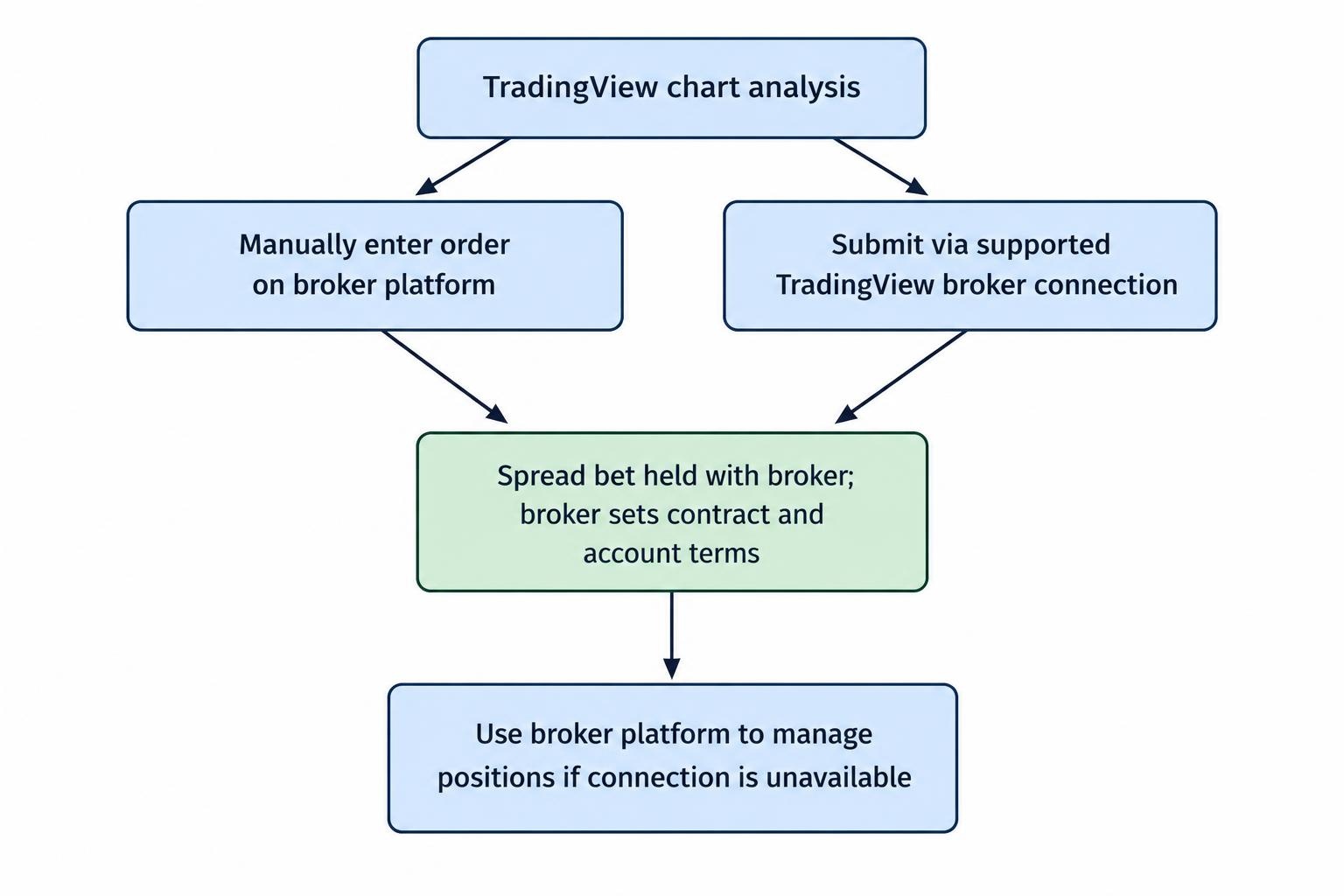
Separate the charting interface from the brokerage service. TradingView is where you analyse the chart and interact with the connected trading account. The spread betting contract, dealing terms, margin requirements and account charges still need to be checked with the broker.
There are also two different uses of TradingView. You can analyse a chart and then enter a trade manually on another platform, or use a supported brokerage connection to submit the order from TradingView. Only the second provides direct execution through the integration.
Neither approach changes the product you hold. A CFD does not become a spread bet because you place it from a familiar chart. If the contract distinction is unclear, review spread betting versus CFDs before connecting an account.
Keep the broker’s own platform available as a backup. Before opening positions, establish how you would inspect, amend or close them if the TradingView connection became unavailable.
How to Compare TradingView Spread Betting Brokers
Start With Tradable Markets, Not the Headline Market Count
Write down the instruments you actually use. A trader focused on GBP/USD and a UK equity index has different requirements from someone trading individual shares around earnings announcements.
For each instrument, check its availability through the spread betting connection, its minimum stake, dealing hours and contract type. Distinguish a cash market from an expiring contract. Similar names can conceal different funding arrangements or expiry dates.
Then inspect the chart’s price provider. An exchange index, an index futures contract and a broker’s cash index quote are not interchangeable entry prices. Use the tradeable broker instrument when preparing an executable order, and verify the bid and ask rather than relying solely on the last visible candle.
This matters for alerts too. If an alert is based on a different feed, treat it as a prompt to inspect the broker’s quote, not a promise that the same price is available for execution.
Check Stake Size and Point Value
The smallest permitted stake should fit your risk budget. A platform can be easy to use yet unsuitable for a small account if its minimum position is too large for the stop distance your strategy requires.
Check what one point means for each contract. Do not infer the cash exposure from the number of decimal places on the chart or from a quantity field that looks familiar. The ticket’s quantity, contract value and account statement should tell the same story.
Our explanation of stake per point covers the calculation. For broker selection, the practical question is whether the permitted increments let you size the trade sensibly, rather than rounding the stake up and hoping for the best.
Verify Order Controls Inside the Connection
Prepare a short list of orders your trading method needs. That might include pending entries, attached stops and profit targets, partial closures or guaranteed stops. Check each function inside the connected account instead of assuming the broker’s native platform and TradingView offer identical controls.
Pay attention to amendments. Can you change the stake, move a stop and cancel a pending order clearly? Does the platform display confirmation that the broker accepted the instruction? A line moved on a chart is not enough; check the resulting order status.
If guaranteed stops are a requirement, confirm availability for the market and through the connection, together with premiums and minimum distances. The comparison of brokers with guaranteed stops is a useful next check, but platform compatibility still needs separate confirmation.
Compare Costs at Your Normal Trading Time
Measure the spread on the spread betting instrument during the hours you intend to trade. A minimum advertised spread is not a complete cost estimate, and a quote observed during a busy session may not represent the price available outside it.
Include financing if you expect to hold positions overnight. Compare the calculation method, the rate applied to your contract and the treatment of weekends or holidays. In its October 2026 feedback, the FCA highlighted continuing concerns about overnight charges and how clearly firms communicate them, including spread betting within the review’s scope. See the FCA findings on derivative trading charges and disclosures.
For the shortlist, calculate the cost of a representative trade rather than comparing isolated fee labels. A slightly wider spread could matter less than a lower holding cost for one strategy, while the reverse could apply to frequent intraday trading. Our guide to comparing total spread betting costs provides a broader framework.
A Practical Cost and Sizing Example
Suppose you plan an index spread bet at £2 per point. The following figures are hypothetical and do not represent the pricing of any named broker.
| Comparison item | Account A | Account B |
|---|---|---|
| Quoted spread | 1 point | 1.5 points |
| Stake | £2 per point | £2 per point |
| Spread cost at an unchanged quote | £2 | £3 |
| Other costs | Check separately | Check separately |
The spread difference is £1 for that position. It does not establish which account is cheaper after financing, subscription costs or differences between the requested and executed prices.
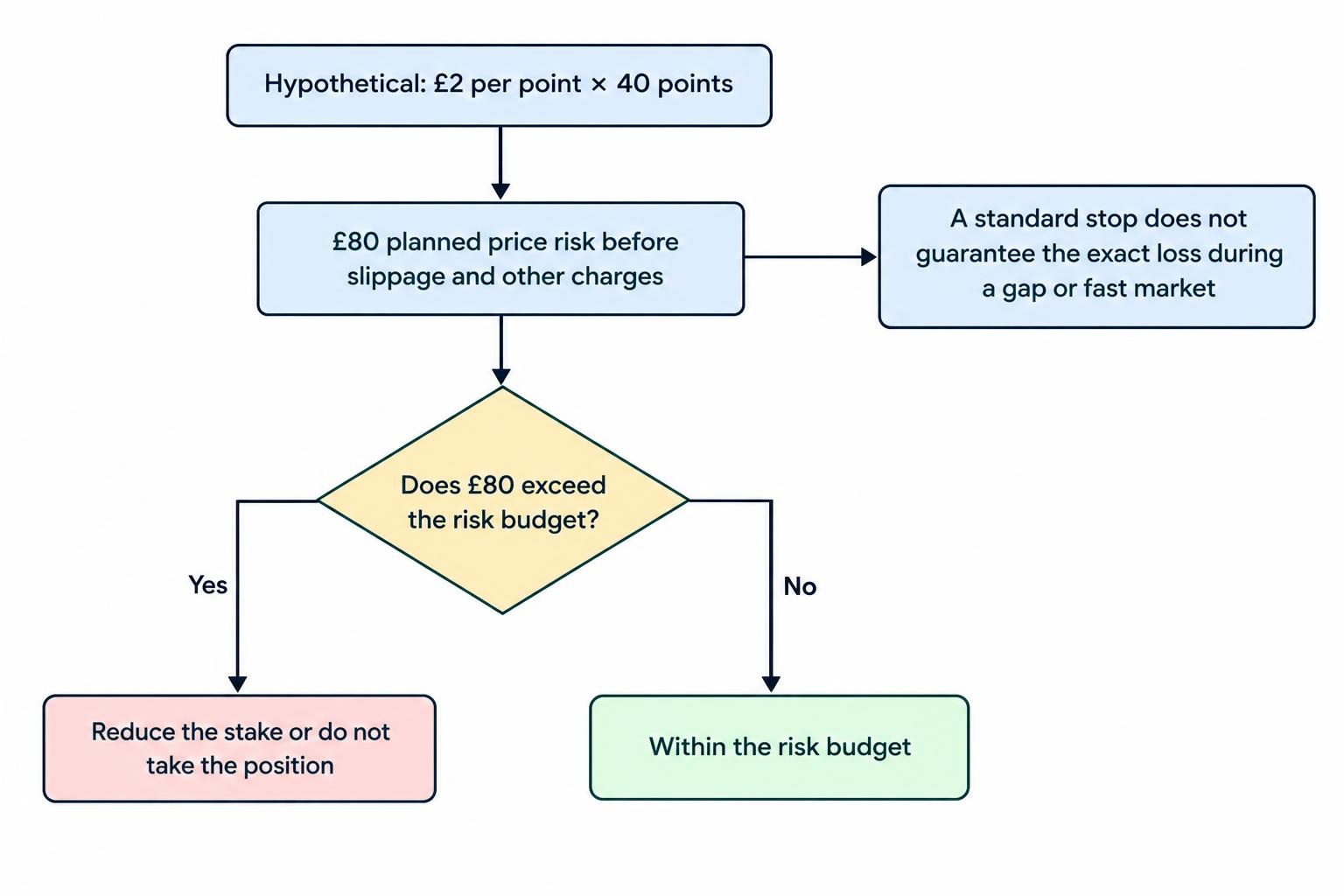
Now consider position risk. If the intended entry-to-stop distance is 40 points, a £2 stake gives a planned price risk of £80 before slippage and other charges. A standard stop does not guarantee that exact loss during a gap or fast market.
If £80 exceeds the trade’s risk budget, reduce the stake or do not take the position. Do not squeeze the stop closer simply to accommodate the broker’s minimum size. The position sizing guide covers this decision in more detail.
TradingView Plans, Data and Other Platform Costs
Separate the brokerage bill from the charting bill. Before paying for a plan, identify the chart layouts, indicators, alerts and historical data your method needs, then check the current subscription terms. Avoid buying features because they look useful in a comparison grid.
Check data permissions separately. Ask whether the feed used for analysis is live, whether any exchange subscription is required and whether the connected broker supplies the tradeable quote you need. Do not assume that paying for more charting features resolves every data entitlement.
For share trading, make the distinction between chart data and permission to trade the broker’s share contract particularly clear. Our guide to market data fees covers the questions to ask before subscribing.
Include any paid charting or data service in the strategy’s cost budget. A monthly subscription is still an expense when no trade is open.
Connecting and Testing a Spread Betting Account
Once you have a shortlist, test the workflow before committing substantial funds. Use a broker demo connection where one is available for the intended account type, rather than assuming simulated practice reproduces the live setup.
- Confirm the account. Check the broker’s legal entity, your eligibility and the spread betting designation.
- Connect through the trading panel. Select the intended broker and authorise the correct account, taking care to distinguish demo from live.
- Choose an eligible instrument. Check its provider, contract type, point value, minimum stake and dealing hours.
- Test the full order process. Practise entry, amendment, cancellation and closure, then reconcile the resulting position and history.
Test an attached stop and profit target, not just a market entry. Check what happens to the remaining orders after you close the position. Also practise returning to the account after logging out and confirm that you can identify its open positions without ambiguity.
Keep practice realistic. A large virtual balance and oversized positions can hide minimum-stake problems that would matter in a smaller funded account. The spread betting demo account guide covers the limits of simulated trading.
During any later live evaluation, record requested prices, fills, order confirmations and charges. Avoid treating one smooth trade, or one poor fill, as a complete assessment of the connection.
FCA Regulation and Account Protection
Check the legal entity named in the application and account agreement. A recognisable brand name does not replace that check. Use the guide to checking a broker on the FCA Register to compare the firm’s details and permissions with the account being offered.
For UK retail clients, the FCA’s rules for leveraged spread bets include minimum opening margin requirements, an account-level margin close-out rule at 50% of the required margin, and negative balance protection. These protections are set out in FCA Handbook COBS 22.5 on retail speculative investments.
Negative balance protection does not make an individual trade safe or preserve the money in the account. Nor should the margin close-out threshold be treated as a substitute for a trading exit. Choose exposure you can afford before placing the order.
Questions to Settle Before Choosing a Broker
Does a TradingView Connection Prove the Account Supports Spread Betting?
No. Check the account designation and the instrument you are ordering. The documented connections above distinguish spread betting access from the broader brokerage integration. Repeat that check if you add another account or change the product you trade.
Should You Choose the Broker With the Lowest Spread?
Not on that figure alone. Compare the trade you expect to place, including stake increments, holding costs and required order controls. A cheaper headline price is not useful if the account cannot support the position size or exit method you need.
Can You Assume a Chart Alert Will Place a Trade?
No. Treat alerts, strategy testing and live order submission as separate functions. If automation is part of your plan, verify the complete supported route, its permissions and its failure handling before relying on it. An alert notification is not an execution confirmation.
What Should Decide the Final Choice?
Choose the account that passes the practical checks: eligible spread betting access, the right instruments, manageable stakes, clear costs and usable order controls. Then test the connection and backup access. TradingView should simplify the workflow, not become a reason to overlook the broker underneath it.