A mobile spread betting app should make it easy to check exposure, place an order accurately and manage an existing position. Charts and news matter, but a readable deal ticket and clear account figures matter more. A phone screen leaves little room for confusion over whether you are staking £1 or £10 per point.
The best app for your needs depends on the markets you trade, the orders you use and how much work you expect to do away from a computer. Start with a suitable provider from the wider choice of spread betting brokers, then assess its mobile platform. A polished app cannot make an unsuitable account suitable.
Spread betting carries a high risk of rapid losses. Mobile access makes an account more convenient to manage; it does not make the underlying trade safer. This guide focuses on choosing and using an app, rather than ranking providers by unverified claims about speed or reliability.
What a Mobile Spread Betting App Should Do
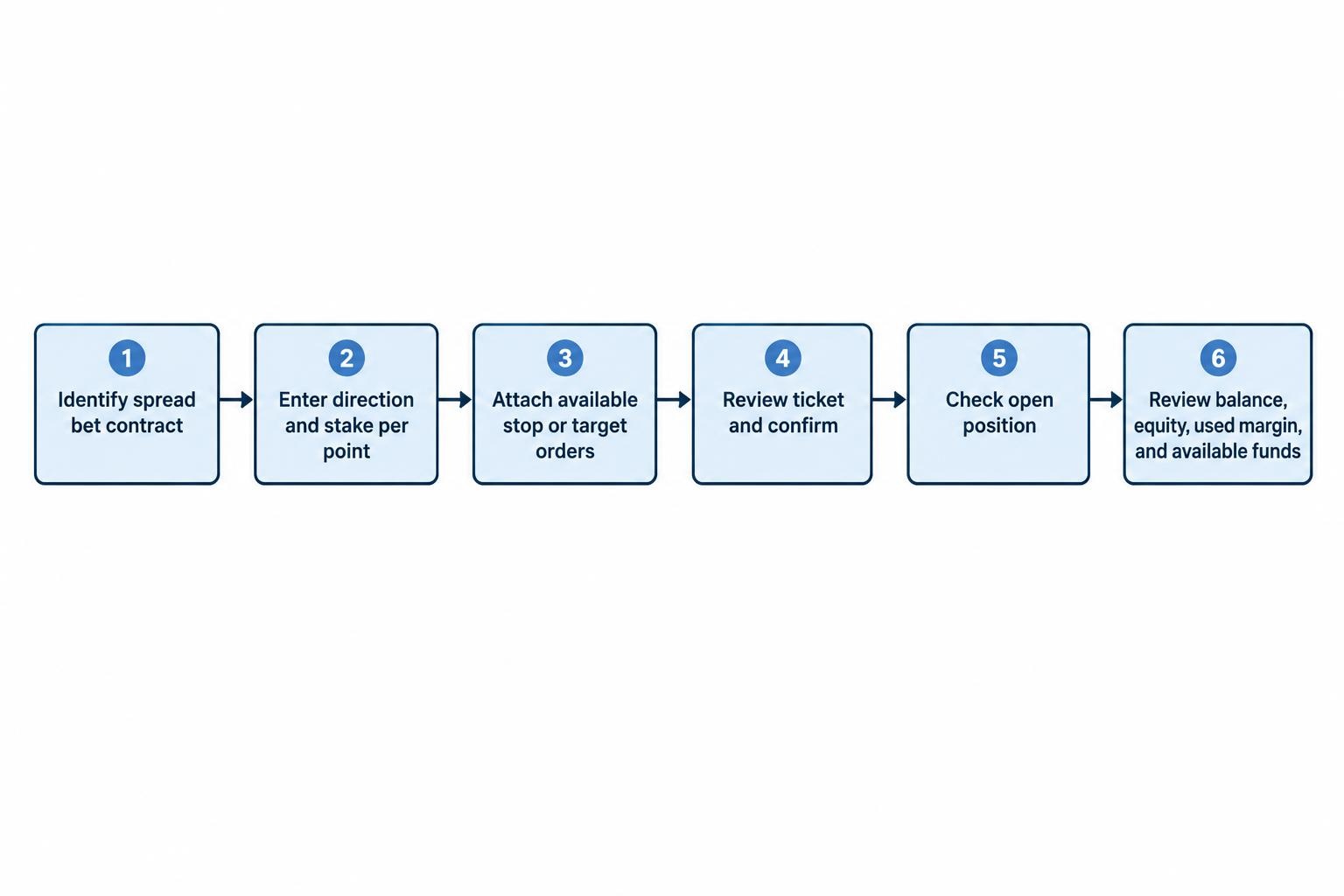
The basic requirement is straightforward: you should be able to identify the right market, enter a stake per point, attach available orders and review the position after execution. The app should also show your balance, equity, used margin and available funds without requiring a hunt through several menus.
Check the account type before assessing anything else. An app may offer spread betting alongside CFDs, share dealing or other products. Finding the same index in two account sections does not mean you are placing the same type of trade. The distinction between spread betting and CFDs still applies on a phone.
For a spread bet, the ticket should make the stake currency and value per point obvious. It should identify whether you are opening a daily funded position or a contract with an expiry date. Similar market names are not enough: check the full contract description.
Set a minimum standard before comparing extras. Reject an app if you cannot comfortably read the ticket, distinguish buy from sell, inspect attached orders or find the route to close a position.
Mobile Spread Betting Apps to Compare
The following examples have published app listings that describe financial spread betting. They provide a starting point, not an exhaustive market comparison or a hands-on execution ranking. Features shown are publisher descriptions, not independently measured performance.
The table uses selected UK App Store and Google Play listings. It is not a complete device compatibility list. Check the current version for your phone, account and country before applying.
| App | Published features relevant to spread betting | What to check before choosing |
|---|---|---|
| CMC Trading: Spread Bet & CFDs | Spread betting and CFD access, multiple chart types, technical indicators, watchlists, trading alerts and a virtual funds demo are included in the CMC Trading UK App Store listing. | Try the chart controls on your screen size, check the available order types and confirm which settings carry across devices. |
| IG: Trading. Investing. Crypto | The published features include spread betting, customisable watchlists, price alerts, ordinary and guaranteed stops, and demo access in the IG trading app Google Play listing. | Confirm the correct app for your account and check that the orders you need are available on your chosen markets. |
| StoneX Trading: Global markets | The former City Index App Store listing now opens under StoneX Trading. Spread betting, TradingView charts, Performance Analytics and demo access appear in the StoneX Trading UK App Store listing. | Check the current account access arrangements, then test chart handling and the route from an open position to its attached orders. |
| Spreadex Trading: Forex & CFDs | Financial spread betting, charting, advanced orders and price alerts by text, push notification or email are described in the Spreadex financial trading Google Play listing. | Confirm you have selected the financial trading product, then inspect stake increments, order controls and notification settings. |
Use published features to decide what to investigate, not to declare a winner. “Advanced charting” does not tell you whether drawing a horizontal line is comfortable with your thumb. “Fast execution” is not a measured comparison of your likely fills.
Keep a short record of what each app does well and where it creates friction. Compare the same tasks on each platform: finding a market, preparing a ticket, changing a stop and closing part of a position where supported. That produces a more useful shortlist than comparing screenshots.
Choose an App for Your Trading Routine
For a first live account
Prioritise clear stake entry, visible risk controls and a straightforward account summary. A confirmation screen is useful while learning the interface. Resist the temptation to enable the fastest dealing mode simply because it exists.
The app also needs to fit the account. Minimum stakes, market access, support and charges deserve attention alongside usability. The comparison of spread betting brokers for beginners covers that wider decision.
For frequent intraday trading
Focus on repeatable actions: switching between a small watchlist, inspecting the current spread and adjusting existing orders. Count the steps needed for those tasks. A feature hidden behind four menus may be acceptable once a month, less so several times a session.
If your approach involves day trading with spread bets, decide which decisions belong on a larger screen. Mobile access can support a prepared plan without becoming the place where every trade idea begins.
For positions held over several days
Give more weight to account monitoring, financing information, alerts and dependable access to existing orders. Check that you can identify the correct contract and any expiry date quickly. A useful mobile layout should help you review a position without encouraging unnecessary changes every time the price moves.
Features That Deserve the Closest Inspection
A Deal Ticket That Makes Mistakes Harder
The ticket should clearly show the market, direction, stake, order type and attached stop or target. Where estimated loss at the stop is displayed, inspect the assumptions behind that figure. Do not treat it as an unconditional maximum loss for an ordinary stop.
Test the numeric controls carefully. Can you type a decimal stake accurately? Does the app keep the previous stake when you switch markets? Is the quoted point size clear? A familiar-looking number can mean something different on another contract.
Also check the difference between closing a position and placing a new trade in the opposite direction. Establish the correct route through the position screen rather than assuming a sell button will always reduce an existing long position.
Keep confirmation prompts enabled until you can complete the process without hesitation. Saving one tap is a poor bargain if it makes an avoidable sizing error easier.
Order Controls You Can Inspect and Change
Assess the orders you actually use, not the total advertised count. You may need a pending entry, an attached stop, a profit target or partial closure. Check whether those controls are available on mobile for your chosen contract.
The distinctions between spread betting order types matter more than the label on a button. A price alert is not an exit order, and a pending entry is not an open position.
For each attached order, inspect its trigger level, distance from the market and any expiry setting. Test whether changing the position size also changes the size covered by the order. Do not leave that question until a live trade needs attention.
If you want protection at an agreed stop level, check whether a guaranteed stop loss is available. Review its premium, minimum distance and conditions. An ordinary stop should not be treated as a cheaper version of the same guarantee.
Readable Charts, Not Just More Indicators
Try your normal chart layout on the actual device. Can you read candles, switch timeframes and move between charts without losing context? Does rotating the phone help? A long indicator menu is of little value if the chart itself becomes crowded.
Check synchronisation rather than assuming it. Save a watchlist or chart setting on one device and inspect it on another. Test drawings, indicator settings and alerts separately; success with one item does not establish that everything transfers.
If you prefer another charting interface, examine the account connection as well as the graphics. The guide to TradingView spread betting brokers addresses that choice. Embedded TradingView charts and access to a connected trading account are not interchangeable promises.
Useful Alerts Without Constant Noise
Set alerts for decisions you have already defined. A notification near a planned entry zone can prompt a review. Notifications for every small move can turn monitoring into an invitation to interfere with a trade.
Test your chosen delivery method and phone settings before relying on it. Check notification permissions, sound settings and what appears on the lock screen. Treat an alert as a prompt, not as a substitute for an order accepted by the broker.
For position protection, confirm how the broker holds and triggers the relevant order. Do not build a plan that depends on noticing a message and manually closing within a few seconds.
Compare Trading Costs, Not the Download Price
A free app download says nothing about the cost of using the trading account. Examine the spread, financing arrangements, guaranteed stop charges where applicable and any other fees relevant to your activity.
Compare costs for the market and holding period you intend to use. An intraday index trade and a share position held for a week require different questions. The app should make contract information and applicable charges easy to find before submission.
Minimum stakes deserve close attention. Suppose your planned stop is 40 points away and your intended loss allowance is £20 before costs and possible slippage. That calls for 50p per point. If the market’s minimum is £1 per point, the trade does not fit that allowance. A lower deposit requirement does not solve the sizing problem.
Check brokers offering smaller stakes if minimum trade sizes repeatedly conflict with your plan. Do not tighten a sensible stop just to squeeze a larger minimum stake into the account.
A spread calculation can also put apparently small differences into context. In a hypothetical market, a one-point spread at £2 per point represents £2 of initial spread cost. A two-point spread represents £4. These are illustrations, not current broker quotes.
For positions held beyond the day, include the relevant financing or contract pricing rather than stopping at the spread. A total spread betting cost comparison is more useful than choosing an app because one advertised starting spread looks attractive.
A Worked Example: Checking a Mobile Trade
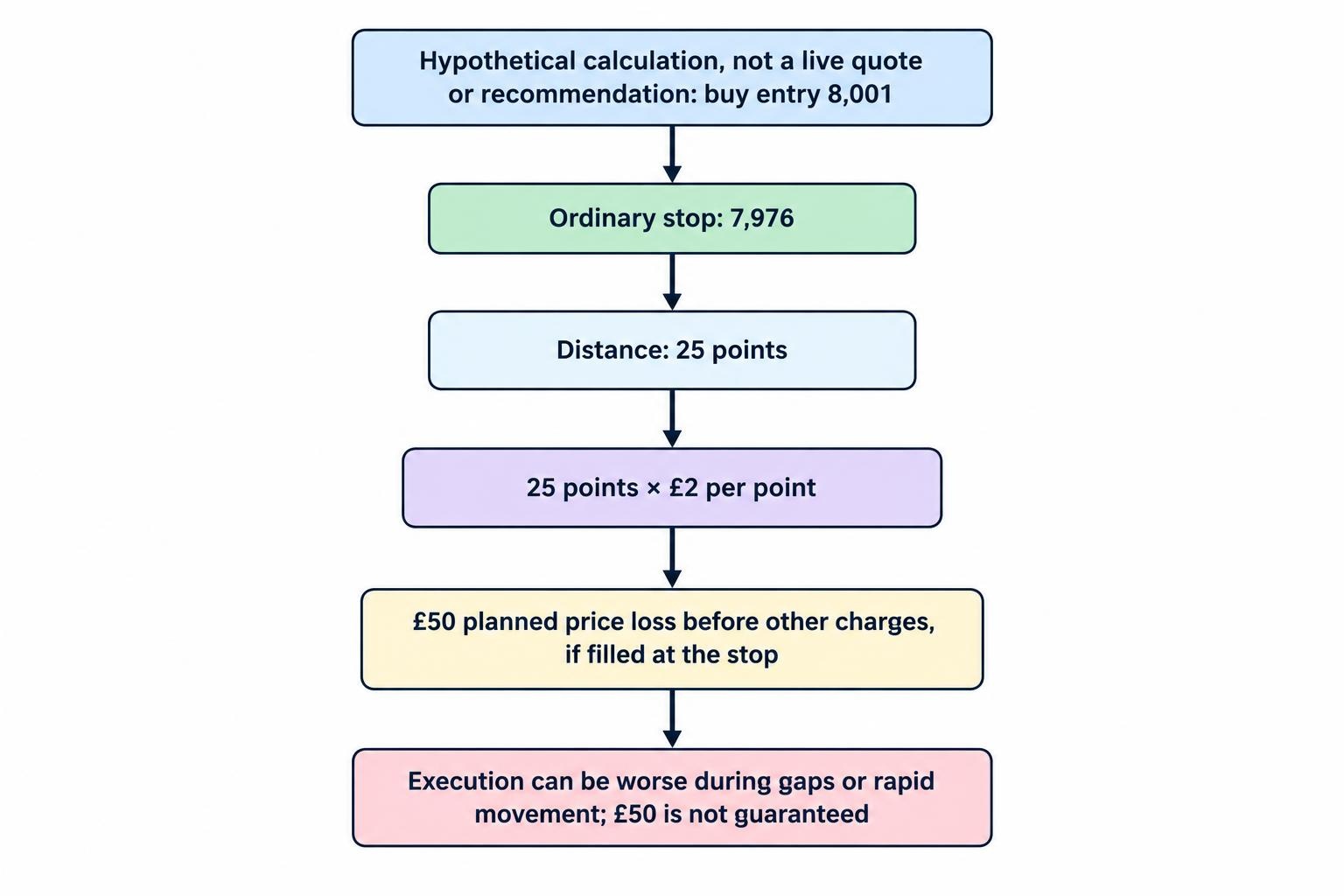
Assume a hypothetical index quote of 8,000 to sell and 8,001 to buy. You plan to buy at £2 per point and place an ordinary stop at 7,976. These numbers are illustrative, not a live market quote or a trade recommendation.
The distance from the entry price to the stop is 25 points. At £2 per point, the planned price loss is £50 if the exit fills at 7,976, before any other applicable charges. A higher or lower margin figure does not change that calculation.
Before submitting, check that the ticket says buy, £2 per point and the correct contract. Inspect whether 7,976 is being entered as an absolute stop level or whether the field expects a distance. Confusing those inputs is precisely the sort of mistake a demo rehearsal should expose.
If the position later closes at a sell price of 8,051, the price profit is 50 points multiplied by £2, or £100 before other charges. Because the calculation uses the actual buy entry and sell exit, do not subtract the opening spread again.
Work out the intended stake before opening the ticket. The method in position sizing for spread betting helps separate the amount you intend to risk from the deposit needed to open a position.
The £50 stop calculation is a plan, not a promise. An ordinary stop can execute at a worse price during a gap or rapid movement. That difference is slippage, and a clean mobile interface does not remove it.
Test the App Before Funding an Account
Use a demo where available to rehearse the tasks that matter. The aim is not to produce an impressive virtual profit. It is to find operational problems before they involve real money. Compare the arrangements in spread betting demo accounts if practice access is part of your selection process.
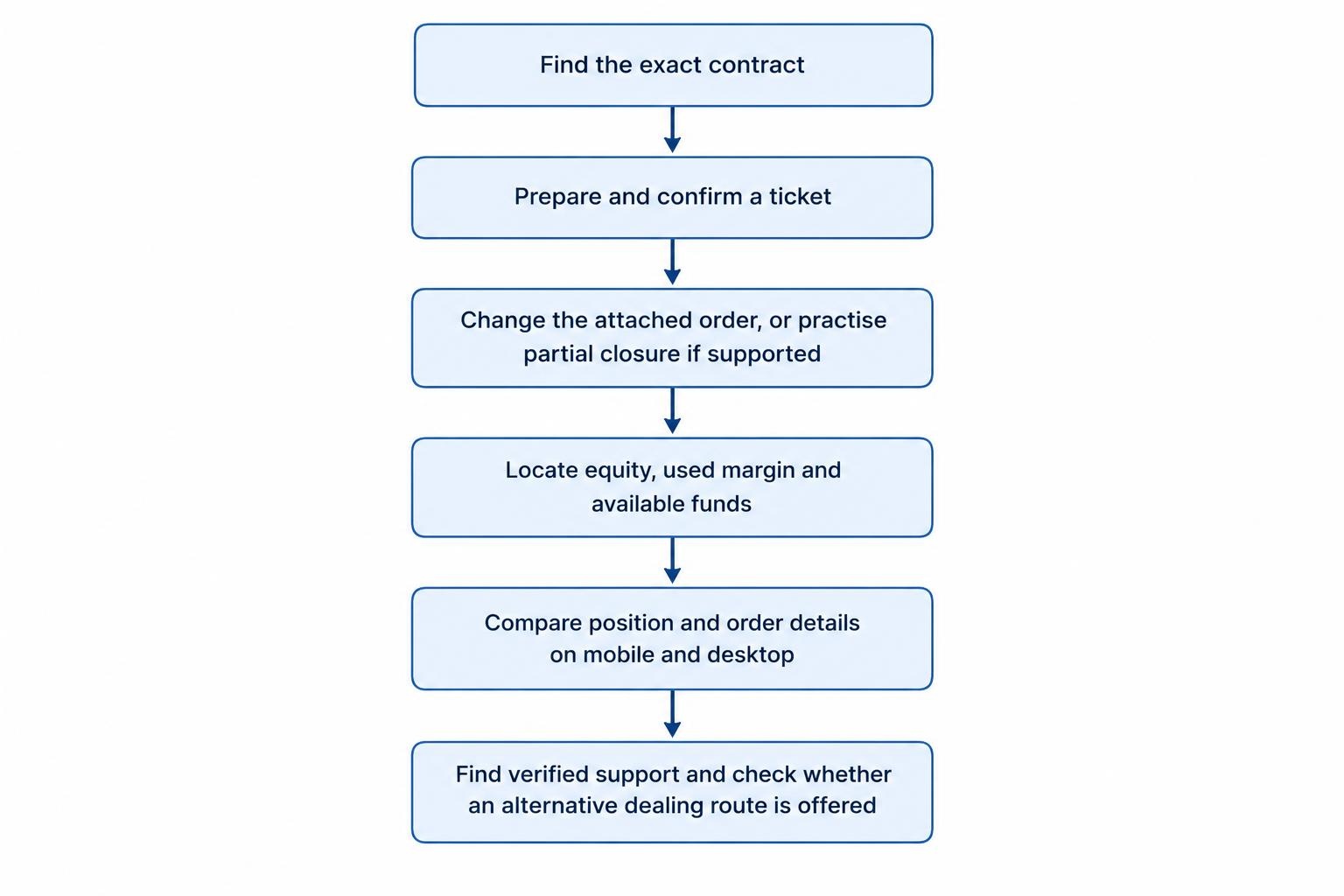
- Find the exact contract. Distinguish similar names, cash markets and contracts with an expiry.
- Prepare a complete ticket. Enter the direction, stake, stop and target, then read the confirmation.
- Manage the position. Change an attached order and practise a partial closure if supported.
- Inspect account figures. Locate equity, used margin, available funds and transaction history.
- Check cross-device access. Compare the position and order details on mobile and desktop.
- Rehearse support access. Find verified contact details and establish the alternative dealing route, if offered.
Run the rehearsal with your normal font settings and screen orientation. If you use accessibility features, check the ticket and confirmation with those enabled. A layout that works in a promotional screenshot may not work comfortably in your hands.
Keep the same trial tasks for every candidate. Note unclear labels, accidental taps and information that takes too long to find. Do not mistake a successful demo session for proof of future live execution quality or profitability.
UK Regulation and Account Protection
Assess the firm and account behind the app. For UK retail spread betting within the relevant rules, the FCA framework includes minimum margin requirements, account-level margin close-out requirements and negative balance protection. Where net equity falls below 50% of the required margin, positions must be closed as soon as market conditions allow. Liability for the covered products is restricted to the funds dedicated to them in the account. These requirements appear in the FCA rules for CFDs, spread bets and similar speculative investments.
Those protections do not prevent the loss of money in the account. Nor should the margin close-out mechanism be treated as your personal stop loss. Keep your trading plan separate from the broker’s account protection procedures.
Read the account documents before accepting a different client classification or contracting entity. The guide to retail client protections covers the wider safeguards; an app’s appearance tells you little about which terms apply.
Check the App, Publisher and Login Security
Match the firm’s identity, permissions and contact details independently before sending money. Fraudsters can copy the details of an authorised business. Use the checks in the FCA guidance on clone firms rather than trusting a registration number supplied in a message.
After identifying the genuine firm, confirm the app publisher and download route. Avoid installing a trading app from an unsolicited message or giving another person remote control of your phone to “help” with account setup. Stop the process if you cannot independently establish who you are dealing with.
Use a separate account password and enable two-step verification where supported. Protect the email account used for password resets too. Keep recovery arrangements somewhere safe outside the phone itself; the NCSC guidance on two-step verification includes backup options for loss of access to the usual second step.
Biometric access can be convenient, but review the account’s wider authentication and recovery settings rather than judging security by the login screen alone. Also consider whether lock-screen notifications reveal balances, positions or other information you would rather keep private.
Keep the operating system and app updated, and check that automatic updates are actually working. Security patches address weaknesses that attackers may exploit. The NCSC advice on software and app updates covers this basic maintenance.
Prepare for Connection Problems
Write a fallback plan before opening positions. Keep verified support details accessible without relying on the trading app. Establish whether browser access or telephone dealing is available, what it can handle and whether extra charges apply.
If a submission appears to hang, do not keep pressing the dealing button. Reconnect and check the order list, open positions and transaction history before deciding whether another instruction is needed. When the status remains unclear, contact the broker through the verified route.
Confirm where your protective orders are held. For an order accepted and held by the broker, the relevant trigger process is not dependent on keeping the app visible. Device-based or external automation needs separate checks. Ask about the actual order rather than relying on a general statement about the platform.
Closing an app does not close an open position. A flat battery is an access problem, not an exit instruction. Plan exposure on the assumption that you may be temporarily unable to reach the account.
Should Mobile Replace Desktop Trading?
Use each device for the tasks it handles comfortably. A larger screen may be preferable for comparing charts, reviewing several positions or reading account documents. A phone may be sufficient for checking a prepared setup or managing an existing order.
There is no requirement to make every decision on the device that sends the instruction. You can plan on desktop and use mobile for a narrower set of actions. Define those actions in advance so convenience does not become permission to improvise.
If checking the app repeatedly leads to extra trades or repeated stop changes, reduce notifications and set review times. Mobile access should support discipline, not undermine it.
Mobile Spread Betting App Questions
Is an iPhone App Better Than an Android App?
Do not choose by operating system alone. Test the current app on the device you intend to use, with your account type and normal settings. Check compatibility, readable controls and the functions you need rather than assuming identical features across versions.
Can I Manage the Same Position on Mobile and Desktop?
Confirm that both interfaces access the same trading account and support the required controls. During a demo rehearsal, check the position size, attached orders and recent changes on both devices. Do not confuse shared account access with synchronisation of every chart preference.
Can I Use a UK Spread Betting App Abroad?
Check the broker’s residency, travel and access terms before departure, along with any applicable local restrictions. Download availability is not proof that you are eligible to open or use the account. Do not use a VPN to bypass an account restriction.
What Should Decide the Final Choice?
Choose the app that handles your required tasks clearly, at acceptable account costs, with suitable market access and verified account arrangements. Give more weight to accurate stake entry, manageable orders and a workable fallback route than cosmetic extras.
Once chosen, keep the app’s role narrow enough to fit your trading plan. If convenience starts producing trades that were never planned, address overtrading before looking for another platform. More buttons rarely fix that problem.