MetaTrader 5 spread betting brokers need to support two things on the same account: the MT5 platform and financial spread betting. A broker offering both somewhere in its product range does not necessarily let you combine them. Its MT5 connection may be reserved for CFDs.
Pepperstone has an explicitly published UK MT5 spread betting route. IG is another candidate to check, but confirm that its dedicated MT5 Spread Bet account is available to you before transferring money. This is a focused shortlist, not a claim that every eligible provider has been identified.
The decision goes beyond platform access. Check the markets available through that connection, how MT5 volume translates into pounds per point, and what the account charges for holding positions. Spread betting involves substantial risk, and familiar software does not make a leveraged position safer.
Which Brokers Should You Consider for MT5 Spread Betting?
Start with the account and legal entity, then check the platform. The wider spread betting broker directory covers providers beyond this MT5 shortlist, including those using their own trading software.
| Broker | MT5 Spread Betting Status | Main Check Before Opening |
|---|---|---|
| Pepperstone | Its UK MT5 product information explicitly includes spread betting. | Select the spread betting account rather than a Standard or Razor CFD account, then verify the required instruments. |
| IG | Candidate requiring direct confirmation of the UK MT5 Spread Bet account route. | Confirm account eligibility, available markets and the separate MT5 funding arrangements before committing funds. |
Pepperstone: A Published MT5 Spread Betting Route
Pepperstone’s UK MT5 information separates spread betting from its Standard and Razor CFD accounts. That distinction matters: a headline raw spread attached to a Razor CFD account should not be treated as the price of a spread bet.
The published spread betting route includes forex, indices, shares and commodities. Still, check the individual symbols you intend to trade rather than assuming every market advertised across the group appears on your MT5 login.
Platform availability is only the first filter. Compare the spread during your trading hours, funding charges and minimum practical stake. The DayTrading.com assessment of Pepperstone’s accounts and platforms provides broader account research, but its general CFD pricing should not be substituted for the spread betting terms.
IG: Confirm the Dedicated Account, Not Just MT5 Access
Before considering IG for this purpose, ask whether you can open a live UK MT5 Spread Bet account under the relevant spread betting entity. An MT5 CFD account is not an interchangeable substitute.
Request confirmation of the instruments you want, their minimum sizes and whether funding sits separately from other accounts. Do not carry over assumptions from the broker’s own platform about available markets, order features or margin settings.
Once availability is confirmed, the IG versus Pepperstone comparison can help frame the broader provider decision. There is no sound basis for declaring either the cheapest MT5 spread betting broker without comparing the same markets, stakes and holding periods.
MT5 Is the Platform, Not the Financial Product
The trading terminal is the interface through which you submit instructions. Your broker supplies the account, instruments, prices and execution arrangements. Installing MT5 does not create a spread betting account or change the legal nature of an existing CFD account.
For broker selection, treat these as separate questions: can the provider connect you to MT5, can it offer you spread betting, and can that particular spread betting account trade through MT5? You need three clear answers.
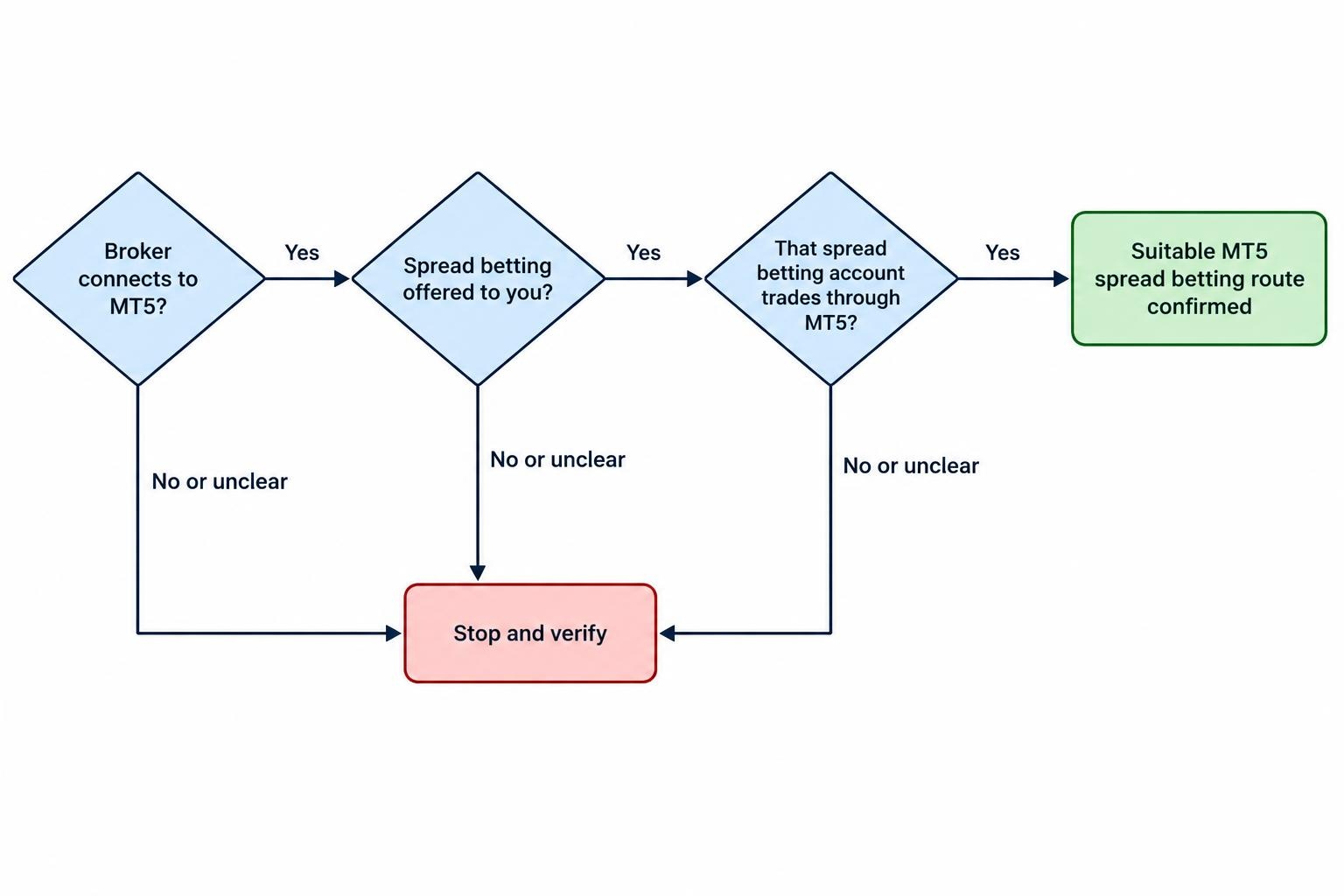
Ask support a direct question: “Can I open a UK retail financial spread betting account on MetaTrader 5, and trade these named instruments?” Include the markets you use. A general reply that the broker “supports MetaTrader” leaves room for MT4, CFDs or an account offered through a different overseas entity.
Save the answer alongside the account documentation. If the opening process presents a different product name, stop and resolve the mismatch before funding it. The distinction is less exciting than a new indicator, but rather more useful.
How Stakes Work on an MT5 Spread Betting Account
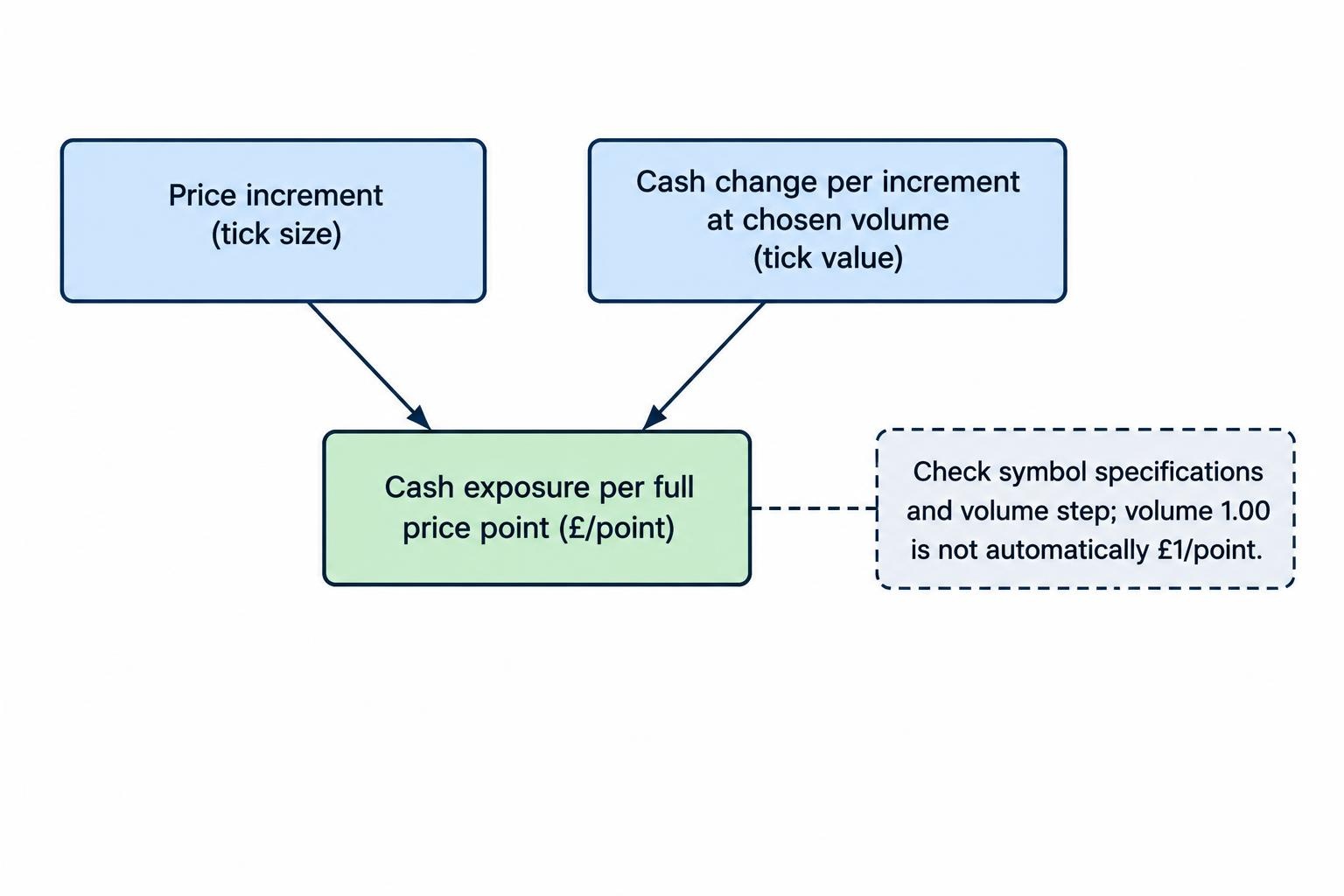
A spread bettor normally thinks in pounds per point. MT5 may present order size through a volume field instead. Do not assume that entering 1.00 means £1 per point, or that the same volume represents the same exposure across two instruments.
Open the instrument’s specification before placing an order. The MetaQuotes documentation for Market Watch and symbol specifications identifies fields including contract size, tick size, tick value, minimum volume, volume step and permitted order types. These are the details needed to interpret the ticket correctly.
Separate three measurements: the smallest price increment, the full price point used for the bet, and the cash value of that movement at your selected size. Decimal places on a chart do not settle the question.
A Hypothetical Stake Conversion
Suppose an index spread betting symbol moves in increments of 0.1 index points. At your chosen order volume, each 0.1 movement changes the position’s value by £0.20. Your exposure is therefore £2 per full index point: ten increments multiplied by £0.20.
A 40 point adverse move would produce an £80 trading loss before funding or other applicable adjustments. A 60 point favourable move would produce £120 before those adjustments. Both calculations use the actual opening and closing execution prices.
If your intended stake was £1 per point, you would need half that volume, provided the broker permits it. Check the volume step rather than rounding upwards because the ticket rejects your preferred size.
The broader stake per point explanation covers the exposure calculation. For an MT5 account, the extra task is proving that the platform’s volume setting produces the cash exposure you intended.
Size From Risk, Not Available Margin
Suppose your planned loss is £40 and your stop is 40 points from the entry price. That implies a £1 per point stake before allowing for execution uncertainty and charges. It does not imply that you should increase the stake simply because the account has enough margin for a larger position.
If the smallest permitted size exceeds your intended risk, the instrument is unsuitable for that trade. More deposited cash would change the account balance, not repair the sizing problem.
Compare the Cost of the Spread Betting Account
Compare like with like. Use the same underlying market, the same pounds per point exposure and the same trading session. A forex CFD commission schedule and an index spread betting quote are not competing prices for the same transaction.
For a hypothetical £2 per point bet, a 1.2 point spread represents £2.40 of spread cost if the underlying market is unchanged and the position is closed immediately. A 2 point spread would represent £4. That difference becomes more relevant as trading frequency rises.
Holding costs require a separate calculation. Ask for the funding formula, reference rate, broker adjustment and charging time. Check the long and short treatment rather than assuming the charges are identical. A position held for several nights needs a different comparison from one closed within minutes.
Use the total spread betting cost comparison to bring those charges together. Platform preference should not hide an expensive holding arrangement.
Measure the spread during the session you actually trade. Record several observations rather than relying on one attractive quote. Include the date, time, instrument and account type so the results remain comparable.
Execution also belongs in the calculation. Keep a record of requested and completed prices, rejected orders and partial closures. A lower displayed spread is not enough to establish a lower realised trading cost.
Check Regulation Separately From Platform Compatibility
Match the legal entity named in the customer agreement with the regulator’s record. A familiar brand name, an MT5 server entry or an app download does not replace this check. The FCA’s guidance on checking firms and permissions covers authorisation, permitted activities and the details to verify before dealing with a firm.
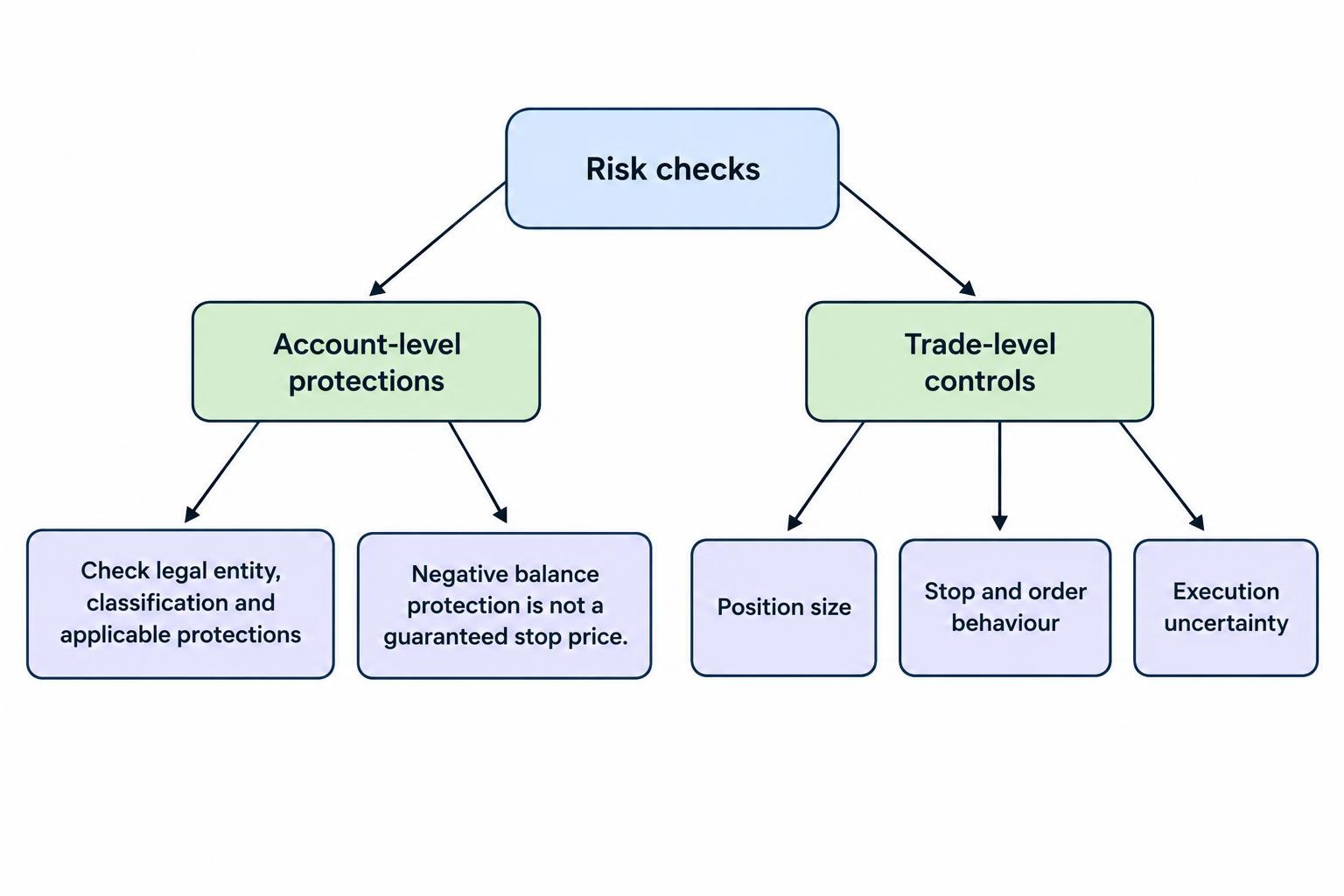
Read the account documentation for your classification and protections. UK retail restrictions for CFDs and similar products include leverage caps, a margin close-out requirement and negative balance protection. The FCA policy statement on retail CFD and spread betting restrictions sets out these measures, including account-level close-out at 50% of required margin and protection against losing more than the funds in the trading account.
Negative balance protection is not a promise that an individual trade will close at its intended stop price. Nor does it protect the money already deposited from trading losses. Assess account protections and trade-level risk controls separately.
Expert Advisors: Check the Broker Connection and the Strategy
Automated trading is a practical reason to consider MT5. Expert Advisors are programs that analyse prices and can submit trading instructions under their programmed rules. MT5 also provides strategy testing tools, covered in the MetaQuotes documentation on algorithmic trading and Expert Advisors.
Compatibility needs checking at three levels: the program, the account and the instrument. Ask the developer for an MT5 version of any existing robot rather than assuming files from another platform will transfer unchanged.
Then check how the program reads the broker’s instruments. Symbol names, price increments and minimum order sizes should not be hard coded from a different account. The MQL5 reference for symbol properties provides the fields for tick values, volume steps, permitted orders and other trading conditions that software needs to handle.
For spread betting, scrutinise the stake calculation before the entry signal. An EA that identifies the intended trade but opens ten times the intended exposure has failed its most basic job.
Test rejected orders, connection interruptions and restarts. Check how the program identifies positions that are already open, and whether it could duplicate a trade after reconnecting. Ask what must remain running locally and what continues on the broker’s server or a hosting service.
Backtesting should be followed by forward testing on the intended account configuration. Treat a strong historical result as a reason to investigate the strategy, not permission to increase its stake.
Stops and Order Features Need Their Own Checks
Do not assume every feature on a broker’s proprietary platform is available through MT5. Ask about the order types supported on your instruments, minimum stop distances, partial closure rules and any restrictions on amending orders.
If a guaranteed exit price is part of your risk plan, verify that the broker offers it on the exact MT5 spread betting account and instrument. A normal stop field does not establish that protection. The distinction between ordinary and guaranteed stop-loss orders should be settled before the position is opened.
For a trailing stop, test what happens when the terminal disconnects. Ask which instructions remain active and which depend on the software continuing to run. Check the behaviour rather than relying on a feature name.
What to Test Before Moving to a Live Account
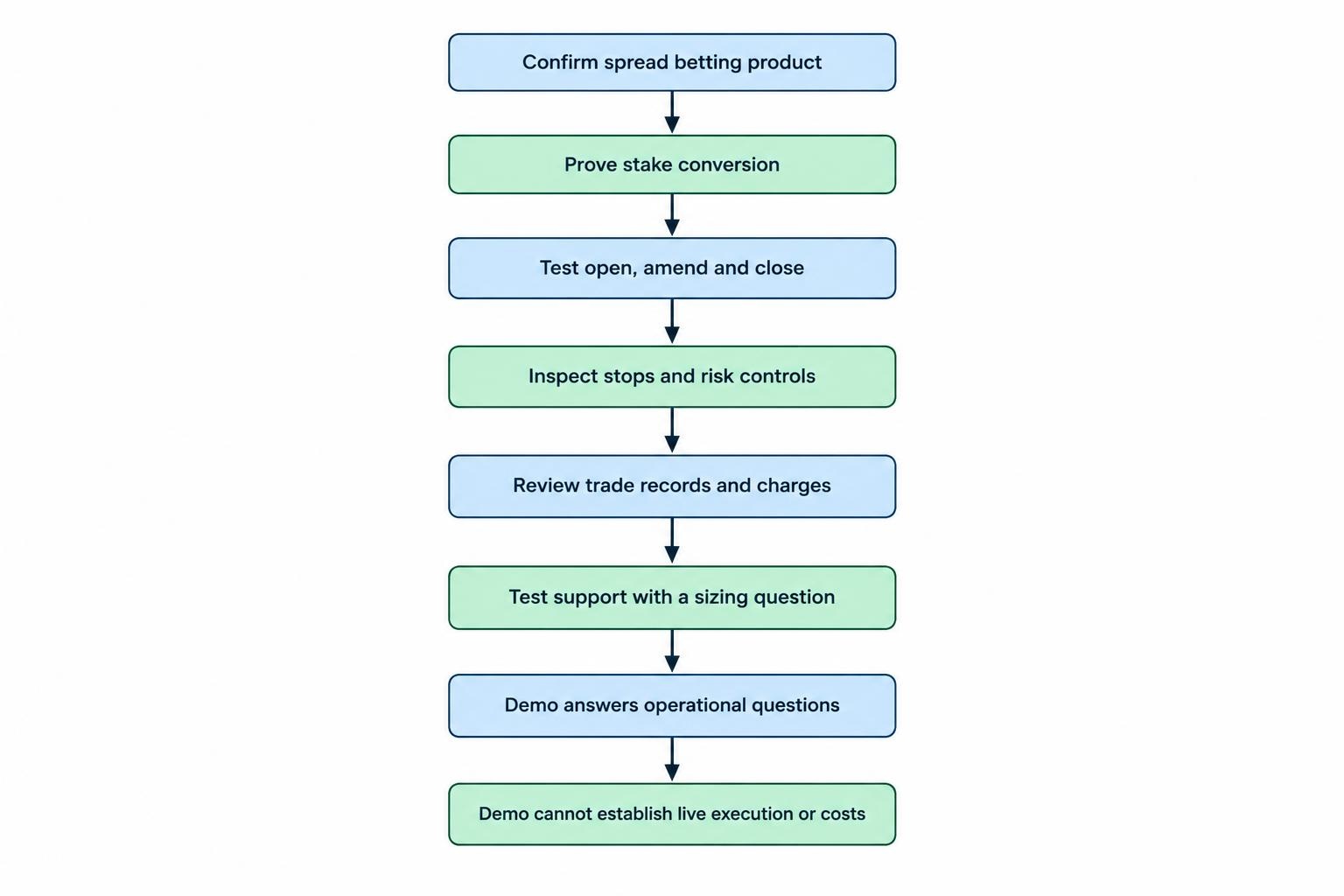
A demo should answer operational questions, not just show that charts load. Use a realistic account balance and your intended stake sizes. A large virtual balance makes margin mistakes unusually forgiving.
- Confirm the product. Check that the account and instrument documentation identify spread betting rather than CFDs.
- Prove the stake conversion. Calculate the expected cash result of a small price movement, then compare it with the displayed position value.
- Test the full order process. Open, amend, partially close and fully close a position. Repeat with the pending orders you intend to use.
- Inspect risk controls. Check stop distances, amendment restrictions and any dependence on an active terminal connection.
- Review records. Find completed trades, charges and adjustments, and establish how to export them.
- Test support. Ask an account question that requires a clear answer, such as the pounds per point exposure of a named symbol at a stated volume.
The spread betting demo account guide covers the wider selection process. For MT5, insist on a demo configuration that resembles the intended live product as closely as possible.
Demo trading cannot establish what every live order will cost or how it will execute. If you later choose to trade live, begin with exposure you can afford to lose and reconcile the first completed trades against your calculations.
When Another Platform May Be the Better Choice
Choose MT5 because it serves a requirement: an MT5 Expert Advisor, an established workflow or tools you intend to use. Do not make the platform mandatory simply because its version number is higher.
If your existing process depends on MT4 software, compare the cost and disruption of changing it with the available MT4 spread betting brokers. A migration needs a practical benefit, not just a newer interface.
If charting is the main requirement and trades are placed manually, TradingView spread betting brokers offer another route to assess. Check product access and order functionality with the same care.
The strongest MT5 shortlist is the one that survives account verification, stake calculations and cost checks. Confirm the spread betting connection first, test the instruments second, then decide whether the provider fits your trading process. The platform should support that decision, not make it for you.