IG is the main UK route to assess if you want to place spread bets through ProRealTime. Its published platform price is £30 a month, with a waiver linked to trading activity. Confirm the qualifying conditions before enabling it, rather than treating access as unconditionally free (ProRealTime availability and pricing in DayTrading.com’s IG review).
The decision involves more than choosing charting software. You need the right account type, suitable minimum stakes, acceptable trading costs and reliable ways to manage positions. A strong platform cannot rescue an unsuitable account. Compare those basics through our spread betting broker guide before making ProRealTime a requirement.
Which ProRealTime Brokers Actually Offer Spread Betting?
For a UK spread betting shortlist, start with IG rather than copying a general list of brokers connected to ProRealTime. Platform compatibility and spread betting availability are separate questions. A connection that supports share dealing, futures or CFDs does not establish that you can place spread bets through it.
Ask a precise question: can an eligible UK client place financial spread bets through ProRealTime on this account? “We support ProRealTime” is not a complete answer. Neither is “we offer spread betting” if those bets are restricted to another platform.
Check the account opening route too. Opening an account directly with a broker and using a platform branded introduction can involve different access arrangements. Do not assume that an offer displayed for another country, account category or trading product applies to your UK spread betting account.
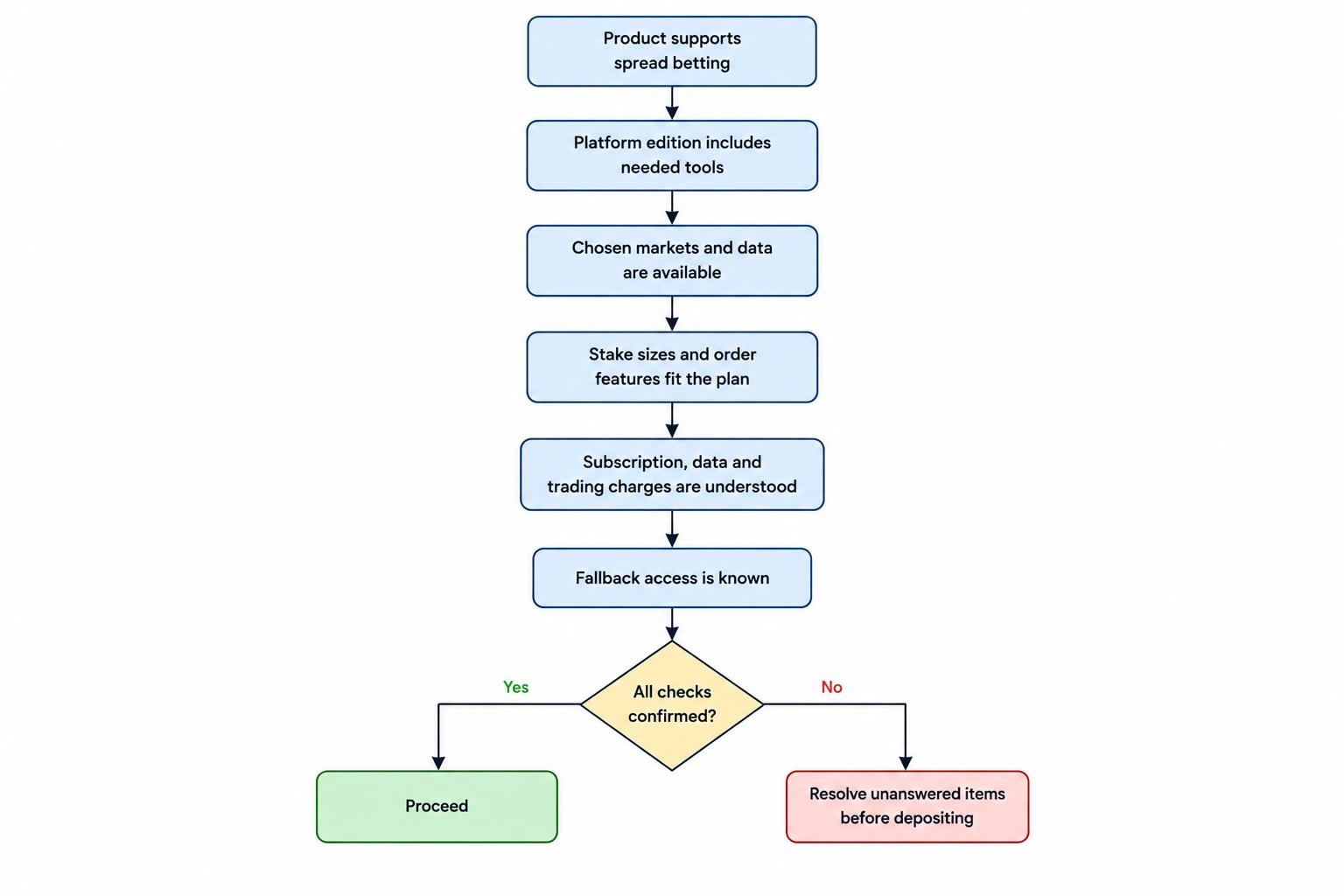
Before depositing, obtain confirmation of the product, platform access and relevant charges. Keep a copy of the terms presented when you enable the service. A saved document is more useful in a fee dispute than a remembered banner.
What to Compare Before Opening an Account
Use the broker’s account documents and a working demonstration to answer the following questions. Treat unanswered points as unfinished checks, not details to sort out after your first trade.
| Check | What you need to establish | Why it matters |
|---|---|---|
| Account product | The connection supports spread betting, not just CFDs or exchange traded products. | The interface does not determine the legal contract. |
| Platform access | The available edition includes the tools you intend to use. | A feature shown in a general demonstration may not match your account. |
| Markets and data | Your chosen contracts are available with suitable price updates and history. | A chart you can view is not necessarily a market you can trade. |
| Stake and orders | Minimum stakes, stake increments and required protective orders fit your plan. | These determine whether you can express the trade at an acceptable risk. |
| Charges | Subscription, data and trading charges are clear. | A waived platform fee does not remove dealing costs. |
| Fallback access | You know another supported way to inspect and manage the account. | You need a procedure if the usual connection fails. |
Check exact contract names, not just asset categories. “UK index” could refer to a daily funded contract or one with an expiry date. Those contracts need not have identical prices, financing or trading hours. Your research chart and order ticket should refer to the exposure you actually intend to trade.
Ask about the practical details of support. Who handles software problems, and who investigates a rejected order or disputed execution? Record the contact route for each before you need it.
When ProRealTime Adds Value
Custom indicators and repeatable market scans
ProRealTime’s programming language, ProBuilder, supports custom indicators, trading strategies and market scans. ProScreener provides the scanning function, while ProBacktest handles historical strategy testing. These roles are set out in the official ProBuilder documentation reproduced by ProRealCode.
The practical benefit is consistency. A trader might want to identify markets that close above a recent high while remaining above a moving average. Defining those conditions creates a repeatable research process instead of relying on whether a chart looks promising that morning.
That does not make the rule profitable. It makes the rule clear enough to examine. Before paying for advanced tools, write down what you need them to do: shortlist markets, calculate an indicator, test an entry rule or manage an automated strategy. “More indicators” is not much of a business case.
Backtesting and automated execution
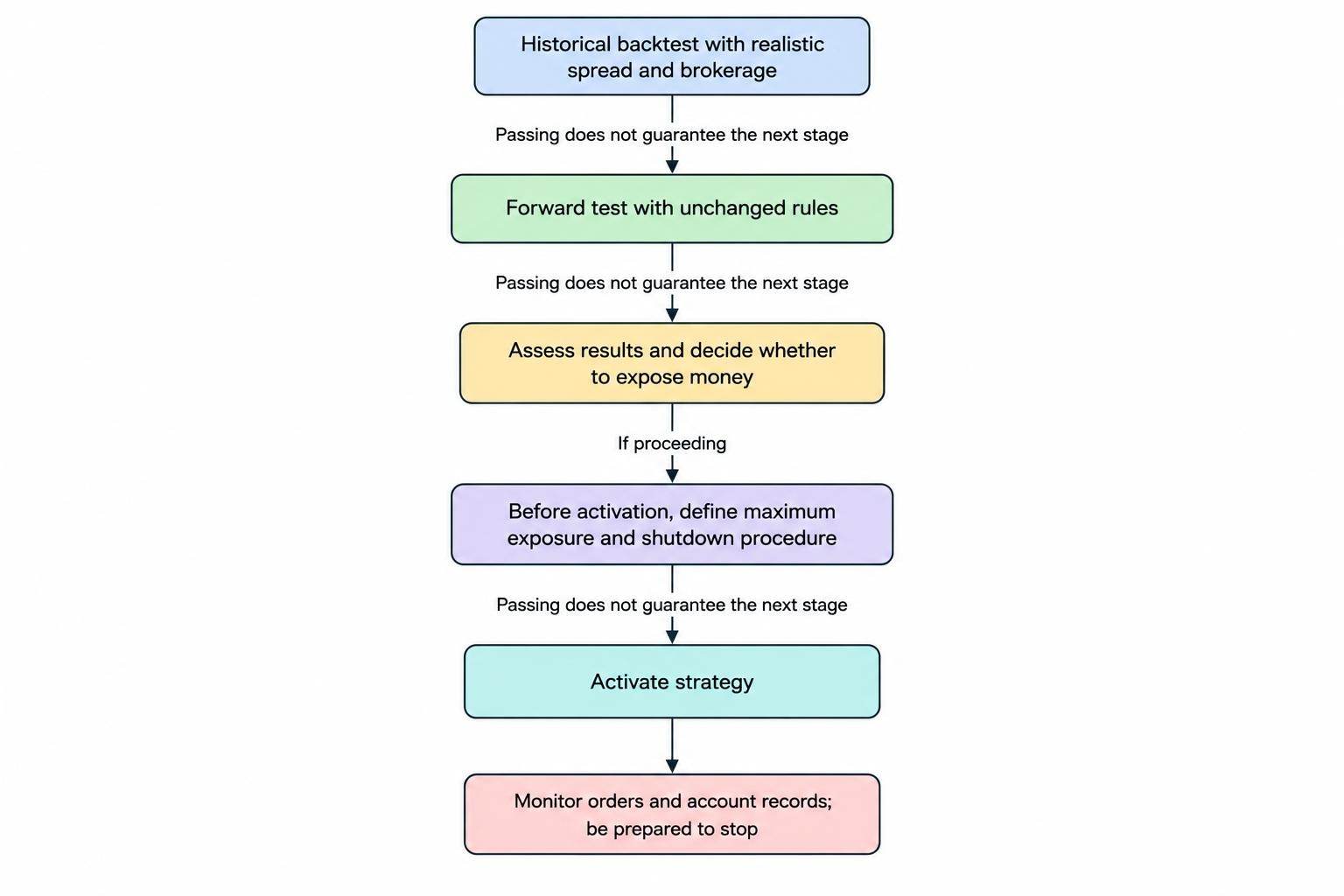
ProBacktest allows spread and brokerage assumptions to be adjusted when testing strategies. ProOrder can then execute an automated system without individual approval of each order, including while the user’s computer is switched off. The official ProBacktest and ProOrder manual covers the transition between testing and automated trading.
Separate three decisions: whether a rule behaves sensibly on historical data, whether it behaves as intended in a forward test, and whether you are prepared to expose money to it. Passing one stage does not settle the next.
As a testing discipline, reserve data that you did not use to select the parameters. Try less favourable spread assumptions and inspect losing periods, not just the final profit figure. A strategy that needs near perfect conditions deserves more investigation, not a larger stake.
For automation, define maximum exposure and a shutdown procedure before activation. Decide what you will do after an unexpected order, a connection problem or a mismatch between the strategy record and the account. Automation should remove repetitive work, not remove supervision.
How to Assess ProRealTime’s Total Cost
Separate the platform subscription from the cost of trading. A subscription waiver changes one line of the bill. It does not tell you whether the account offers good value for your markets, stake sizes and holding periods.
Read the activity waiver carefully
Trade counts deserve particular attention. A Financial Ombudsman decision concerning a £30 ProRealTime charge on 31 May 2023 recorded terms requiring four or more trades for a refund, with a qualification for trades of extremely low value. That is historical evidence, not a substitute for the current tariff, but it shows why a headline trade count may be incomplete (Financial Ombudsman decision on ProRealTime subscription conditions).
Ask what counts as a qualifying trade, which accounts count, which calendar period applies and whether relief takes the form of a waiver or a later refund. Establish how to disable the subscription if you stop using it, and when that cancellation takes effect.
Do not place unnecessary trades to obtain a fee refund. The extra spread, possible slippage and market exposure belong in that calculation too. Saving a subscription charge is a poor reason to invent a trading opportunity.
Measure costs against your actual trading pattern
Consider a hypothetical £30 monthly subscription. Spread across five completed trades, it adds £6 per trade. Across 50, it adds 60p. Neither figure includes dealing costs. This is why the same subscription can be material to an occasional trader and relatively small for a more active one.
Compare quoted spreads during the hours you expect to trade, rather than relying on a minimum spread advertised without context. At £2 per point, a two point spread represents £4 of price friction if the underlying price and spread remain unchanged between entry and exit. Do not count that same quoted spread twice.
For positions held beyond the trading day, include financing and the contract’s adjustment rules. Check any separate data subscriptions or optional services too. Use our total spread betting cost comparison to assess the full bill rather than one attractive headline.
Check Stake Sizes and Order Behaviour
Before placing a live spread bet, verify the monetary value of a point on the selected contract. Do not transfer a quantity from a futures example, CFD demonstration or downloaded strategy and assume it represents the same exposure.
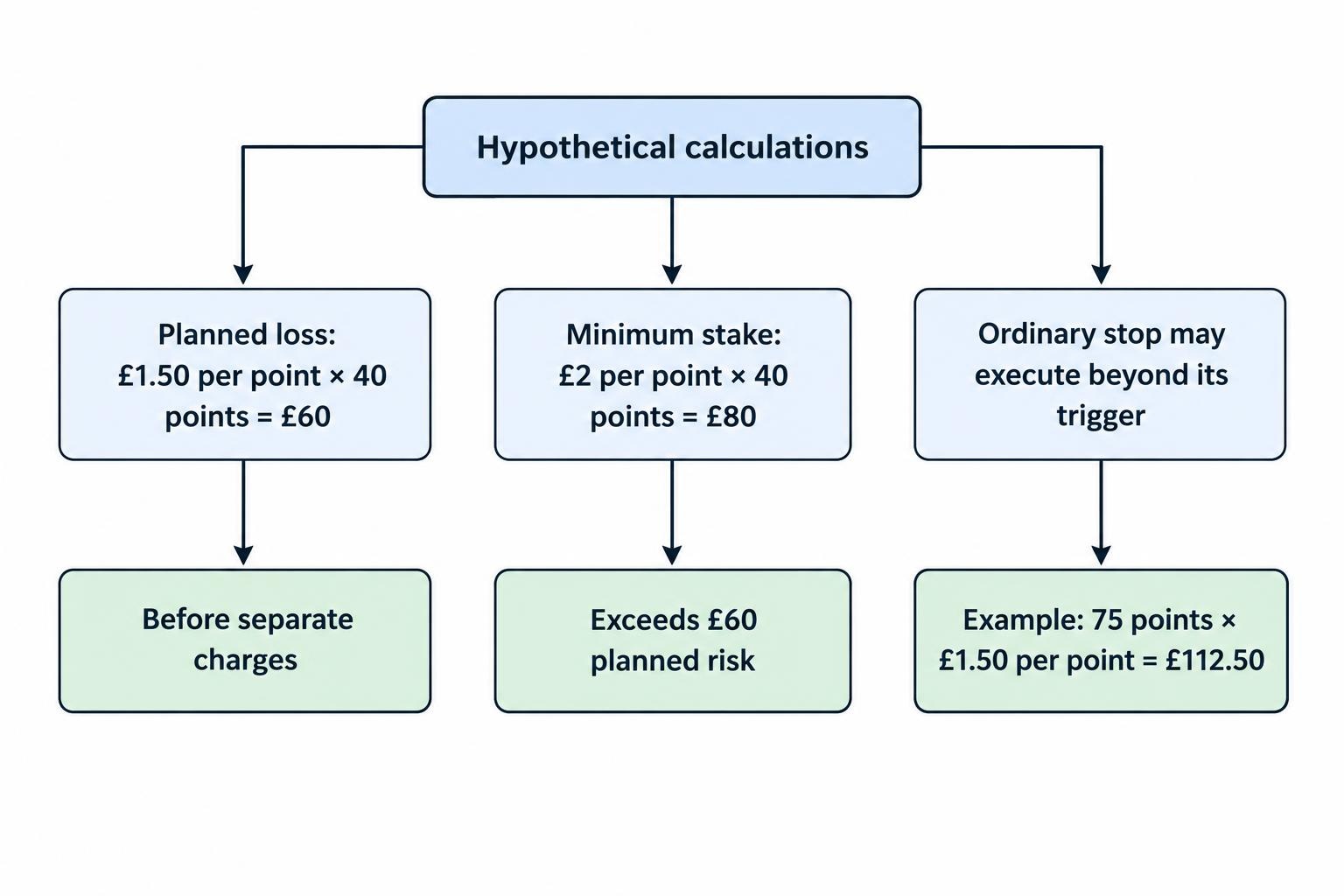
Suppose a hypothetical index spread bet opens at an executed price of 8,000, with a stake of £1.50 per point and a protective stop at 7,960. If the position closes at that stop price, the 40 point adverse move produces a £60 trading loss before separate charges.
If the minimum available stake were £2 per point, the same distance would imply an £80 loss at the intended exit. That account would not fit a £60 planned risk simply because the margin requirement looked affordable. Our position sizing guide separates planned trade risk from the deposit needed to open the position.
Check how the ticket displays stop distances and price levels. Confirm whether changing an order line changes an existing instruction or requires another confirmation. Also establish what happens when you submit an opposite trade: does it reduce the current position, close it or create separate exposure under the selected settings?
An ordinary stop does not promise execution at its trigger price. In the example above, an exit at 7,925 would create a 75 point loss, or £112.50 at £1.50 per point. The difference is execution risk, covered in our explanation of slippage in spread betting.
If you require a guaranteed stop, ask whether it is supported for that market, account and order workflow. Check the premium and restrictions rather than assuming that every protective order offers the same protection.
Run a Demo Test Before Funding Live Trading
A useful demonstration should resemble your intended trading, including market, session, stake size and order sequence. Opening a chart and adding an indicator proves very little. Our guide to spread betting demo accounts covers the distinction between practising a workflow and evaluating live trading conditions.
Use a short operational test:
- Find the exact contract. Check its name, point size, hours and expiry or funding arrangement.
- Calculate the exposure. Match the ticket quantity to your intended pounds per point and planned stop distance.
- Practise the full order sequence. Enter, amend and cancel an order, then inspect the position and transaction records.
- Test protective instructions. Confirm which orders remain attached after a partial close or quantity change.
- Rehearse fallback access. Verify how to inspect the same account and contact support if ProRealTime becomes unavailable.
For an automated strategy, add a forward test with unchanged rules. Record the expected action before checking what happened. Investigate differences rather than editing the strategy until the discrepancy disappears.
Do not treat simulated fills as proof of future live execution quality. The demo is most useful for finding operational mistakes before those mistakes involve money. Once you move to live trading, reconcile the first transactions carefully against your intended orders.
Check the Broker and Retail Protections
The software brand is not enough for regulatory due diligence. Identify the firm named in the account agreement and check that it has permission to provide the service you want. Match its contact details against the regulator’s records. The FCA’s firm authorisation checking guidance distinguishes checking current permissions from researching a firm’s historical record.
For UK retail spread betting, the FCA’s restrictions include asset dependent leverage limits, margin close out protections and negative balance protection. These measures address account exposure; they do not make an individual trade safe or turn an ordinary stop into a guaranteed exit (FCA requirements covering spread bets and similar leveraged products).
Do not change client classification simply to obtain more exposure or different account terms. Compare the consequences in our guide to retail and professional client classification before considering any change.
The platform does not determine tax treatment
Spread bets and CFDs should not be treated as interchangeable because they appear in similar software. HMRC’s capital gains guidance states that spread betting does not create chargeable gains or allowable losses. That is not a blanket statement about every tax, jurisdiction or business arrangement (HMRC guidance on financial spread betting and capital gains).
Confirm the product named in your agreement and obtain tax advice where your circumstances require it. Neither an indicator nor an order ticket changes the nature of the contract.
When to Compare Other Platforms
Keep the comparison focused on tasks. If you need chart based research and occasional manual orders, test whether the broker’s standard platform already does enough. Paying for tools you will not use adds cost without improving the process.
If another charting workflow is central to your method, compare TradingView spread betting brokers, checking the actual account connection rather than the platform logo. If you already depend on an established MetaTrader workflow, assess MT4 spread betting brokers instead of assuming that existing indicators or strategies will transfer unchanged.
You can also separate analysis from execution. If you choose that arrangement, document which price series generates signals and which contract receives orders. Test any differences before relying on the process.
Who Should Consider a ProRealTime Spread Betting Account?
ProRealTime is worth assessing when you have a defined need for custom indicators, repeatable scans, historical testing or automated rules. Make that need concrete enough to test. Then check whether the available spread betting account fits your required markets, stake sizes and risk controls.
It is harder to justify choosing a broker around the platform if you place only occasional manual bets, do not use its additional tools or would trade more often just to avoid a subscription charge.
The sensible order is account suitability, total cost, operational checks, then platform preference. If ProRealTime improves a process you can describe and test, it may earn its place. If not, a simpler setup leaves fewer moving parts to manage.