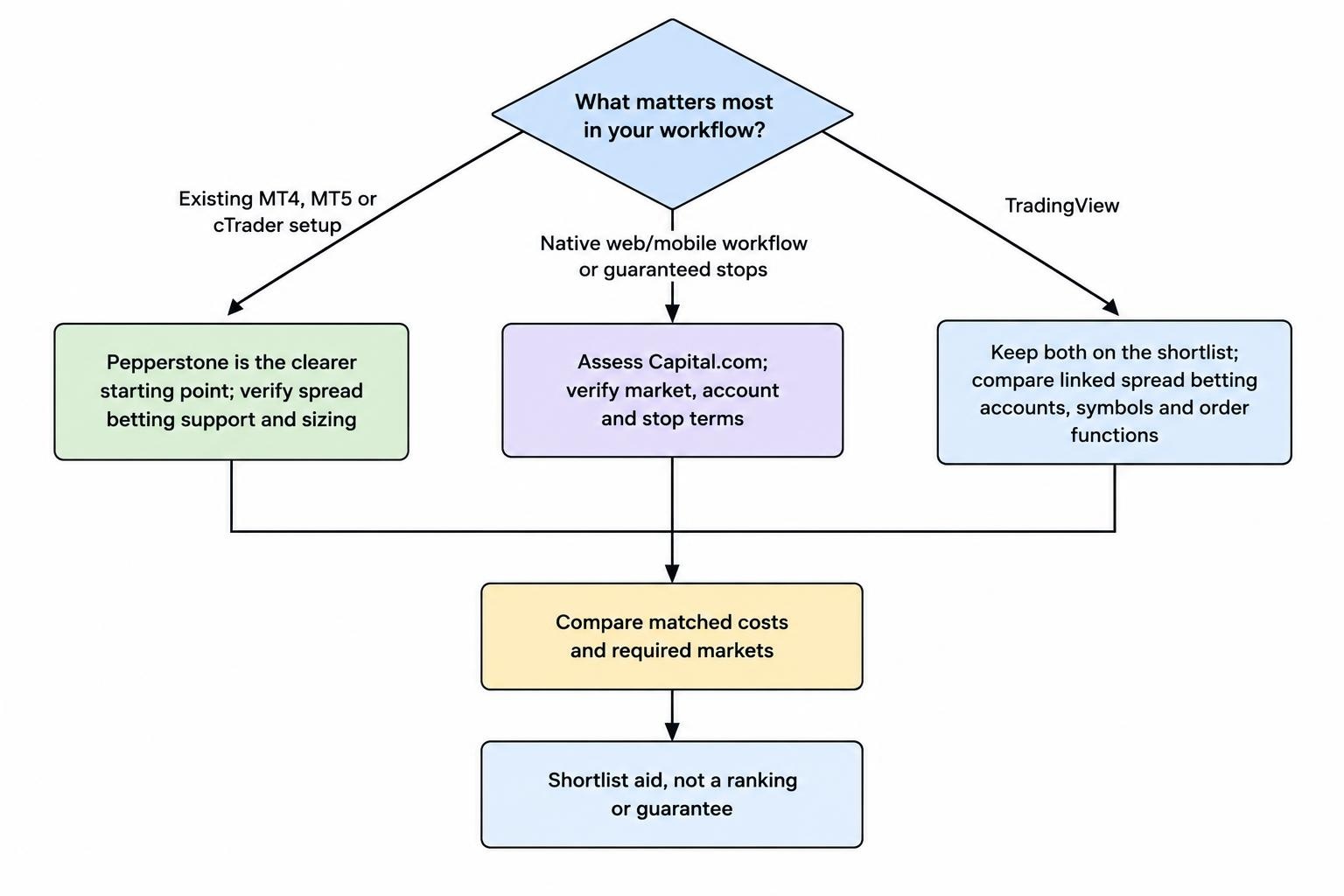
Pepperstone is the stronger starting point if you want UK spread betting through MT4, MT5 or cTrader. Capital.com deserves closer attention if you prefer its own web and mobile platform and want access to guaranteed stop losses. TradingView users can consider both.
The cost comparison needs more care. Pepperstone’s Razor CFD pricing is not its spread betting pricing, and a minimum advertised spread does not establish which broker will be cheaper during your trading session. Compare the same market, account type, stake and holding period before choosing.
This comparison focuses on UK retail spread betting, using product information checked in October 2026. It is not a comparison of the brokers’ overseas CFD accounts. For other pairings, see our spread betting broker comparisons.
Risk warning: Spread betting uses borrowed exposure and can produce rapid losses. Neither a familiar platform nor regulatory protection makes a trading strategy profitable. Only use money you can afford to lose.
Pepperstone vs Capital.com: The Practical Differences
Pepperstone’s main advantage is platform choice. Its own platform sits alongside MetaTrader 4, MetaTrader 5, cTrader and TradingView. That gives traders with established chart layouts, indicators or automated systems more routes to keep their existing workflow. The independent Pepperstone account and platform review also identifies the absence of guaranteed stop losses.
Capital.com combines its own trading interface with third party integrations. Its native platform is worth assessing if you want charts, orders and account monitoring in one place rather than assembling a separate trading setup. Guaranteed stops are another reason to shortlist it, although availability must be checked for the chosen market and account. The Capital.com platform and order feature review covers these distinctions.
| Decision | Pepperstone | Capital.com |
|---|---|---|
| Main reason to shortlist | Choice of trading platforms and continuity for existing technical setups | Native web and mobile trading, with guaranteed stops worth checking |
| MT4, MT5 or cTrader requirement | The clearer starting point for these spread betting workflows | Confirm that the required integration supports your spread betting account, not just CFDs |
| TradingView preference | Available; select the appropriate linked account | Available; connect the spread betting account and instrument |
| Cost comparison | Use spread betting quotes, not Razor CFD headline pricing | Use matching spread betting quotes and holding assumptions |
| Ordinary stop loss | Do not treat the trigger price as a guaranteed exit | Distinguish ordinary stops from guaranteed stops |
| Market selection | Check instrument availability on the intended platform | Check the actual spread betting catalogue, not a global product total |
| Small account suitability | Depends on minimum stake, stop distance and margin | Depends on minimum stake, stop distance and margin |
The table is a shortlist, not a scorecard. A broker can offer more platforms without being the better choice for someone who only trades manually. A cleaner interface can also lose its appeal if it does not support your required order controls.
Costs: Compare Spread Betting With Spread Betting
Do not use Razor pricing as the shortcut
Pepperstone comparisons often lead with its Razor account. That creates an easy mistake: comparing raw CFD spreads plus commission against a spread betting quote at Capital.com. The account structures differ, so the headline numbers are not interchangeable.
The distinction between Pepperstone’s Standard, Razor and spread betting pricing is visible in this UK comparison of Pepperstone and Capital.com account costs. Its practical lesson is to select the intended account before comparing prices. A cheaper quote on a product you do not plan to use is not much help.
For this comparison, start with two UK spread betting accounts. Use the same underlying market and distinguish a cash contract from a dated contract. Record the buy and sell prices at the same time, then translate the difference into pounds at your intended stake.
Do not declare a winner from one quote. Repeat the exercise during the hours you normally trade, including near the opening or closing period if those sessions form part of your strategy. Your own trading window matters more than an attractive minimum shown elsewhere.
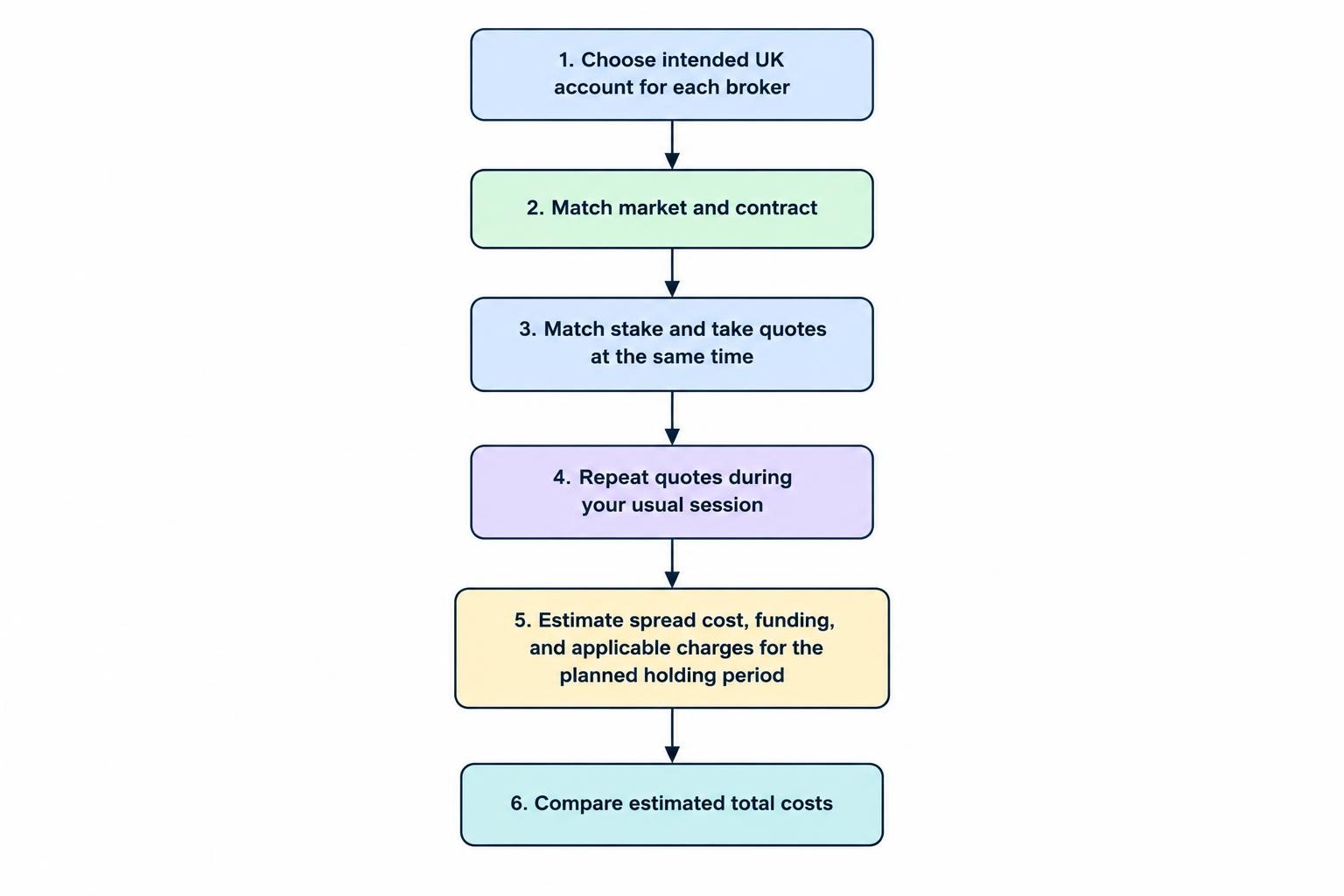
A worked spread cost comparison
Suppose two hypothetical spread betting quotes have spreads of 0.8 points and 1.1 points. At £5 per point, their approximate spread costs are £4 and £5.50 respectively, assuming the spread remains unchanged between entry and exit.
That £1.50 difference becomes £60 across 40 comparable completed trades. These are illustrative figures, not current Pepperstone or Capital.com prices. They show why small price differences can matter to frequent traders without proving that either broker is always cheaper.
A useful comparison must also match the value of a point. A decimal movement on one contract is not necessarily the same economic movement on another. Check the contract specification and use our stake per point guide if the platform’s quantity field is unclear.
When calculating completed trade costs, avoid counting the spread twice. With an unchanged midpoint and an unchanged spread, buying at the ask and immediately selling at the bid produces a loss equal to one spread multiplied by the stake. Changing spreads and execution prices can alter the result.
Overnight funding can reverse the result
For an intraday trade closed before the funding cutoff, entry and exit costs deserve most attention. For a position held over several nights, the financing adjustment can change which account is more economical.
Use the actual instrument’s long or short funding figure. Do not assume that selling a market produces a credit, or that the daily adjustment remains fixed throughout the holding period. Check how the provider handles weekends and holidays rather than multiplying one displayed daily figure without qualification.
Consider a hypothetical account that saves £2 on the spread but costs £1 more per funded night. After five chargeable nights, its initial saving has become a £3 disadvantage. The wider entry spread would have been cheaper for that holding period.
Our overnight financing guide covers the calculation in more detail. For broker selection, the useful output is a pound estimate for the entire planned trade, not a spread figure viewed in isolation.
Also check any currency conversion, guaranteed stop premium and optional platform or data subscription that applies to your setup. Separate unavoidable trade costs from optional services. Otherwise a platform subscription used across several accounts can distort the comparison.
Cost verdict: There is no defensible universal winner without matching quotes and holding periods. Use our total spread betting cost comparison framework to build a repeatable comparison rather than chasing the lowest advertised number.
Platforms: Existing Workflow or a New Trading Setup?
Pepperstone for platform continuity
If you already have a working MT5 or cTrader setup, replacing it has a cost even when no subscription changes hands. You may need to rebuild watchlists, verify indicators, change keyboard shortcuts and adjust how orders are sized.
That makes Pepperstone’s platform choice more useful to an established technical trader than a simple feature count suggests. The relevant question is whether it lets you preserve a workflow you already understand, not whether you can install every platform it offers.
Before moving a system, check the spread betting symbol names, point values, minimum trade sizes and trading sessions. Do not assume an automated strategy written for CFD lots will size spread bets correctly without adjustment. Test the calculation using a small hypothetical position before allowing automated orders.
Also check what happens when you change devices. A desktop indicator, locally running script or saved chart arrangement may not behave the same way in a browser or mobile app. Treat these as migration checks, not minor housekeeping.
Capital.com for a native platform approach
If you are choosing a trading interface from scratch, start by assessing Capital.com’s own web and mobile platform against Pepperstone’s native alternative. The better choice is the one that makes your normal decisions clear without adding avoidable steps.
Test an ordinary trade sequence: find the market, enter a stake, inspect the margin requirement, add a stop and target, then review the order. After opening a demo position, change the stop and close part or all of the trade where supported.
Pay attention to where the interface places information rather than counting indicators. Can you see the stake, exposure and intended exit together? Is it obvious whether you are editing a pending order or an open position? Those questions are more useful than deciding which platform looks newer.
For mobile use, try the same tasks on the phone you actually use. A chart can look excellent while the order ticket remains awkward. If placing a sensible stop requires repeated zooming and menu switching, that deserves more weight than the colour scheme.
TradingView does not settle the comparison
Capital.com supports spread betting through TradingView. The platform operator’s Capital.com spread betting integration instructions distinguish logging into the spread betting account and selecting a spread betting instrument. That account and symbol distinction matters.
For Pepperstone, TradingView’s account connection instructions describe selecting or requesting an account configured for TradingView. Confirm the product type before placing an order rather than assuming your existing login selects the intended account.
Once connected, compare the functions you require. Check stop editing, pending orders, partial closes, position display and access from mobile. Do not assume every function in the broker’s own platform is reproduced identically inside an integration.
If TradingView is non-negotiable, both brokers remain candidates. Our TradingView spread betting broker guide provides a wider shortlist, but the final decision should still come from account costs, market availability and order controls.
Guaranteed Stops: A Material Difference
Capital.com’s guaranteed stop availability is a reason to investigate it before Pepperstone if a fixed exit price forms part of your trading plan. Check the selected spread betting instrument and deal ticket, including whether the order is available through your chosen platform.
A standard stop and a guaranteed stop perform different jobs. An ordinary stop establishes a trigger for closing the position, but the execution price can be worse if the market gaps. A guaranteed stop commits to the agreed exit level under its terms, with a premium or other conditions to consider.
Suppose a trader buys an index at £2 per point and places an ordinary stop 50 points away. The planned price loss is £100 before other charges. If execution occurs 75 points below entry after a gap, the price loss becomes £150.
With a valid guaranteed stop 50 points away, the price loss would remain £100 under the guarantee, but the trader must include any applicable premium in the total loss. That is protection against an execution outcome, not protection against taking a bad trade.
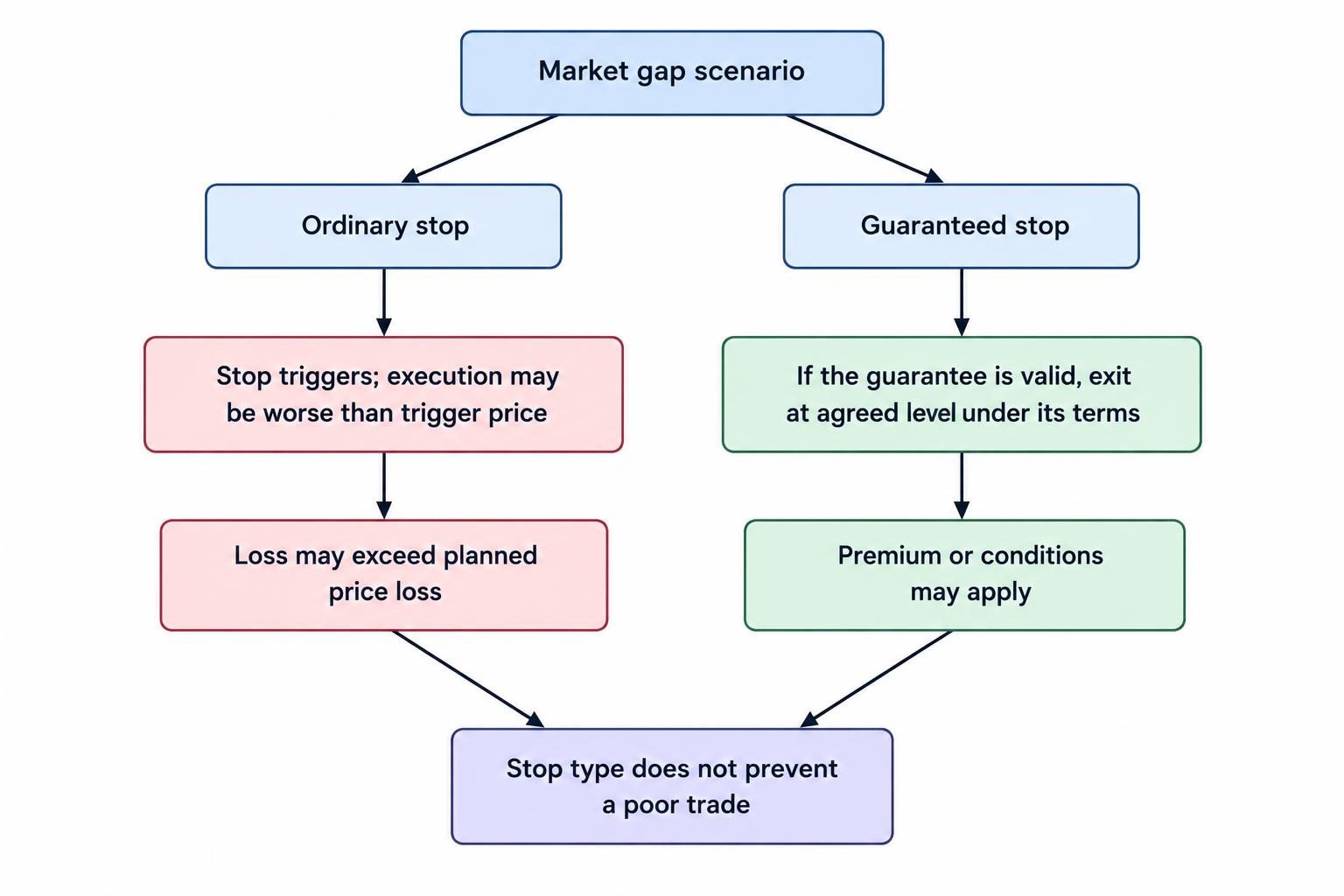
Before choosing Capital.com for this feature, inspect the minimum stop distance, premium, amendment rules and supported markets. Our guaranteed stop loss guide explains the mechanics without treating the feature as a substitute for position sizing.
For a Pepperstone setup without guaranteed stops, assess whether smaller stakes, avoiding event exposure or closing before a market break meet your needs. If your plan requires a contractual exit price, ordinary stops are not an equivalent replacement.
UK Regulation: Check the Account, Not Just the Brand
The relevant UK entities are Pepperstone Limited, associated with FCA firm reference number 684312, and Capital Com (UK) Limited, associated with 793714. Use these details to check the proposed account agreement and current register entry before sending money.
Match the legal name, permissions and contact details. A familiar logo or a copied authorisation number does not establish that you are dealing with the authorised firm. Our guide to checking a broker on the FCA Register sets out the verification process.
UK retail protections include restrictions on gearing, a margin closeout requirement and account level negative balance protection under the FCA’s retail CFD and similar product intervention rules. These controls address different risks; none guarantees that an individual position closes at its planned stop.
Negative balance protection is not a promise that only the money initially assigned to one trade can be lost. Likewise, a margin closeout can affect positions before the exit you intended. Keep enough free funds to operate the account without treating the closeout threshold as your trading plan.
Do not switch to professional classification simply to obtain greater exposure. Compare the protections and contractual treatment first. The distinction deserves its own assessment, covered in our retail versus professional client comparison.
Eligible investment claims can receive FSCS compensation of up to £85,000 per person, per firm, subject to the scheme’s conditions. The FSCS investment protection rules distinguish eligible firm failure claims from poor investment performance. Compensation is not reimbursement for losing spread bets.
Market Range: Check Your Watchlist Before Counting Instruments
Use a real watchlist to compare market access. For an index trader, that might mean the FTSE 100, Germany 40 and US Tech 100. A share trader should check the actual companies they intend to trade, including less frequently traded names.
For each instrument, confirm the contract, trading hours, minimum stake and availability on the intended platform. If you plan to sell short, check that the required position can be opened rather than assuming a displayed market permits every trade direction.
Do not use a broker’s global product total as proof that every instrument is available through UK spread betting. Separate CFDs from spread bets and distinguish platform catalogues. This is particularly important if you select Pepperstone for an older MetaTrader setup or Capital.com for a third party integration.
A wider catalogue only adds value when you will use it. If both brokers cover your five regular markets, compare those markets properly. If one cannot provide a required share or contract, the decision may already be made.
Deposits and Small Accounts: Start With the Trade Size
Check the current funding screen for the minimum attached to your chosen payment method. Do not confuse the amount needed to make a deposit with the capital needed to run your trading plan. They answer different questions.
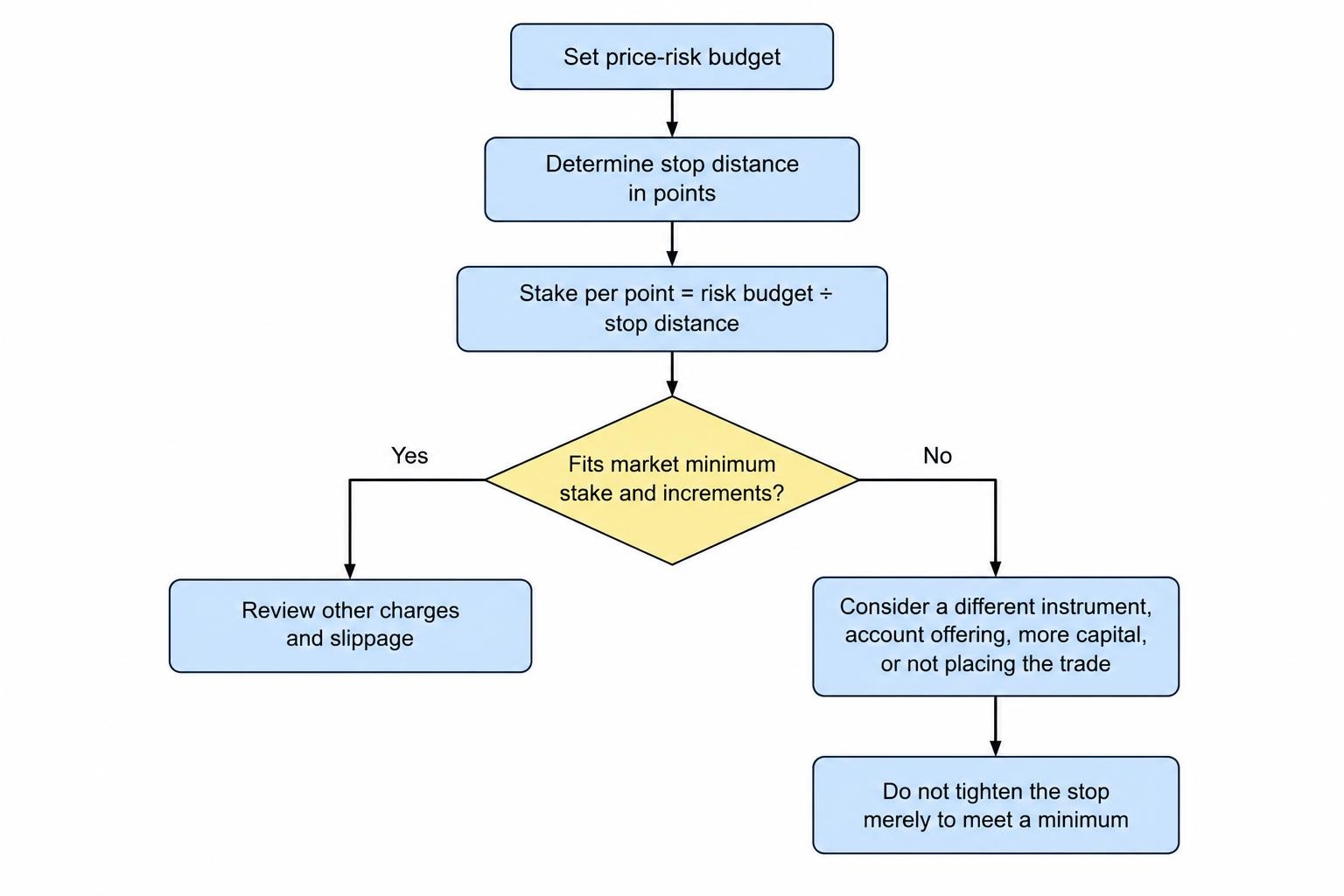
Suppose your account holds £500 and you set a planning budget of £5 for the price movement to an ordinary stop. With a stop 50 points away, that requires a stake of £0.10 per point. If the chosen market’s minimum stake is £1 per point, the same stop implies £50 of price risk before slippage and charges.
Neither a smaller deposit requirement nor a more attractive app fixes that mismatch. You would need a different instrument, a different account offering, more capital or a decision not to place the trade. Moving the stop closer solely to fit the minimum stake changes the trading idea.
Use our spread betting position sizing guide to work backwards from your risk budget. Check minimum stake increments as well as the minimum itself; rounding can alter the intended exposure.
For withdrawals, review the method, verification requirements and expected processing stages before funding. Make a modest withdrawal part of your account checks when practical. Do not commit all available funds simply because an application allows it.
How to Compare the Two Accounts Before Committing
A demo comparison should reproduce your intended routine rather than become a competition to make the largest virtual profit. Set a realistic balance, use planned stakes and trade during the session you expect to use.
- Match the setup. Select the same market, contract type and equivalent stake on both accounts.
- Record costs. Note the spread, displayed funding information and any order related premium.
- Test order handling. Open, amend and close positions; test pending orders separately.
- Check reporting. Find the trade confirmation, account statement and transaction history.
- Test support. Ask an account level question that matters to your proposed setup.
Useful support questions include whether a named spread betting instrument is available through your intended platform, how its point value works and whether a guaranteed stop is supported. Ask for an answer that refers to the UK entity and account type.
Demo trading can help identify interface and sizing problems, but it should not be treated as proof of live execution quality. Our spread betting demo account guide covers how to make the practice account useful without overinterpreting it.
If you proceed to a live account, begin with a small, controlled amount and check the resulting statement. Compare the requested and executed prices, the stake and any adjustments. This is account verification, not a reason to manufacture trades or take unnecessary risk.
Execution should be assessed separately from platform appearance. For a structured approach, use our broker execution quality research framework. Do not rank brokers by headline execution speed alone.
Tax Does Not Give Either Broker an Automatic Advantage
For genuine financial spread betting, HMRC states that no chargeable gains or allowable losses arise. Its Capital Gains Manual treatment of financial spread betting is the relevant starting point. Tax treatment depends on the arrangement and circumstances, not on choosing Pepperstone rather than Capital.com.
Confirm that you have opened the intended product. A CFD account does not become a spread betting account because the same brand offers both. Keep statements and contract details so the product and transactions can be identified later.
The loss treatment also matters: do not assume spread betting losses provide the same relief as losses on taxable investments. Our guide to the tax treatment of spread betting losses covers that distinction.
Which Broker Should You Choose?
Choose Pepperstone if platform continuity comes first
Pepperstone is the more natural shortlist choice if you already depend on MT4, MT5 or cTrader and want to retain that workflow for spread betting. Check the required instruments, sizing and automation behaviour before moving an existing system.
Its platform range is not, by itself, proof of lower trading costs or better live fills. The recommendation becomes stronger when the account also passes your quote comparison and minimum stake checks.
Choose Capital.com if its native workflow and stop controls fit
Capital.com is worth prioritising if you want to assess a self contained web and mobile setup, particularly when guaranteed stops form part of your plan. Confirm the feature on the actual spread betting ticket, including its premium and restrictions.
Do not select it purely because the interface feels easier on the first visit. Run the same order and reporting tasks you would perform during a normal trading week.
If you use TradingView, keep both on the shortlist
TradingView access does not create a clear winner between these two. Compare the connected spread betting accounts, relevant symbols, order functions and full holding costs.
The practical verdict: Pepperstone has the clearer case for traders bringing an established third party platform setup. Capital.com has the clearer case for traders attracted to its native interface and available guaranteed stops. Let the final choice come from your markets, position sizes and order requirements—not a generic broker ranking.